
What this section is for #
The Communication Skills section allows the Tenant Admin to create and manage the communication abilities that the system must recognize during conversations with the avatar.
A Communication Skill represents an observable behavior in the conversation, for example:
- asking an open-ended question;
- showing empathy;
- rephrasing the interlocutor’s point of view;
- asking for clarification;
- proposing a concrete solution.
Each Communication Skill is described through a definition, some examples of phrases that confirm it, and some examples of phrases that do not confirm it. This information is then analyzed by the AI to prepare the recognition rules used during simulations.
Accessing the section #
From the side menu, enter the Tenant Administrator area and select the Communication Skills item.
On this page, you can:
- view the Communication Skills already created;
- check their status, origin, version, and update date;
- create a new Communication Skill;
- access available actions via the three-dot menu.
List of Communication Skills #
The main table shows the Communication Skills available for the tenant.
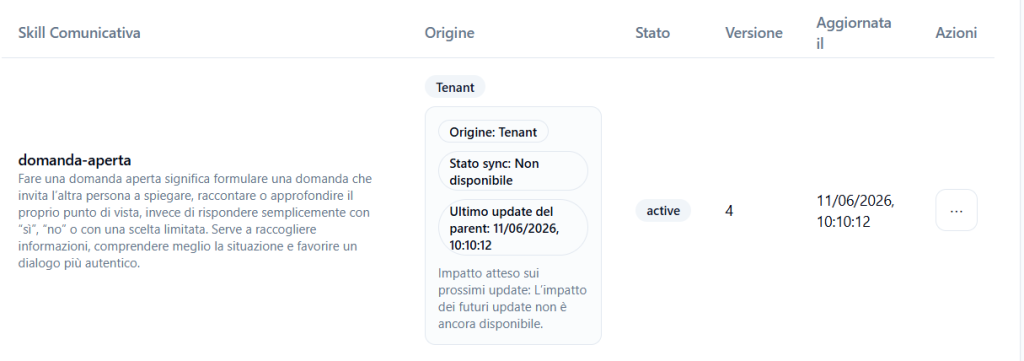
The main columns are:
Communication Skill #
Shows the technical name or slug of the skill, along with its description.
Example:
open-question
Asking an open-ended question means formulating a question that invites the other person to explain, tell, or elaborate on their point of view, instead of simply answering with “yes”, “no”, or a limited choice.
Origin #
Indicates where the Communication Skill comes from.
In the case shown, the origin is Tenant, so the skill was created at the current tenant level.
Additional information may also be present, such as:
- skill origin;
- synchronization status;
- last update of the parent;
- expected impact on future updates.
Status #
Indicates whether the Communication Skill is active or not.
When the status is active, the skill is available for use by the system.
Version #
Shows the version number of the Communication Skill.
The version may increase when the skill is modified, updated, or republished.
Updated on #
Shows the date and time of the last update.
Actions #
The three-dot menu allows access to the actions available for that specific Communication Skill.
Creating a new Communication Skill #
The creation of a Communication Skill takes place in two steps:
- filling in the skill and examples;
- reviewing the AI interpretation and publishing.
Step 1 – Communication Skill + examples #
In the first step, it is necessary to define the Communication Skill and provide concrete examples that help the system recognize it correctly.
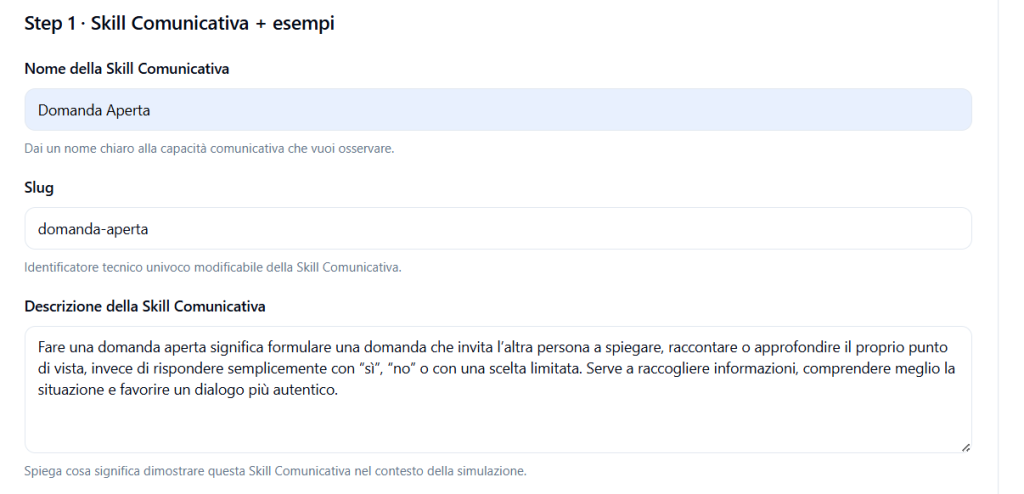
Communication Skill Name #
Enter a clear and understandable name.
Example:
Open Question
The name must directly describe the communication ability you want to observe during the conversation.
Slug #
The slug is a unique technical identifier for the Communication Skill.
Example:
open-question
It is advisable to use a short slug, written in lowercase, without spaces and with hyphens between words.
Correct examples:
- open-question
- active-listening
- clarification-request
- verbal-empathy
Communication Skill Description #
In the description field, you must explain what it means to demonstrate that Communication Skill within the context of the simulation.
The description must be clear and concrete, as it will be used by the AI to understand which behavior it needs to recognize.
Example:
Asking an open-ended question means formulating a question that invites the other person to explain, tell, or elaborate on their point of view, instead of simply answering with “yes”, “no”, or a limited choice. It serves to gather information, better understand the situation, and foster a more authentic dialogue.
Example phrases that confirm this Communication Skill #
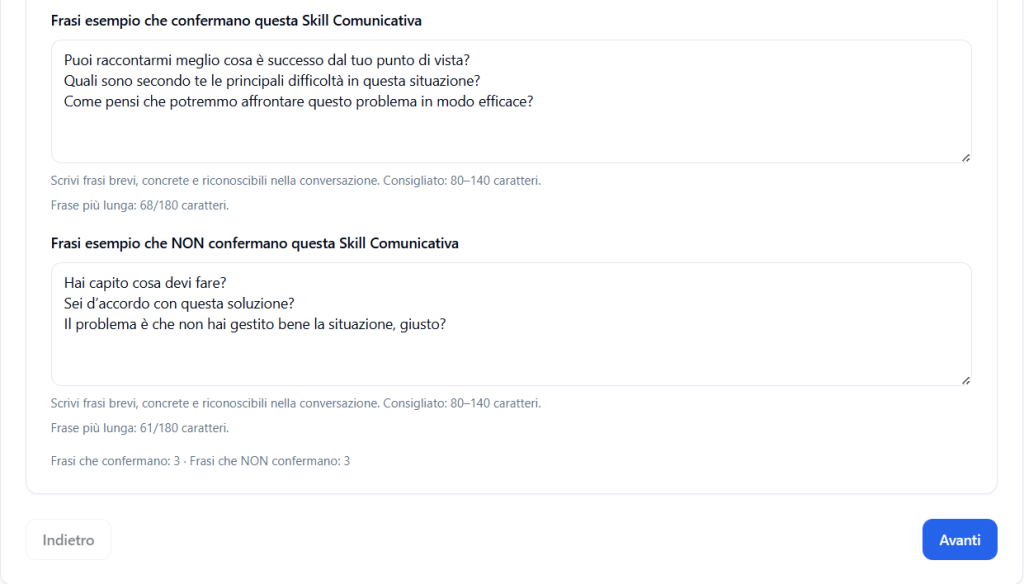
In this field, you must enter phrases that represent a positive example of the skill.
Each phrase must be entered on a separate line.
Example:
Can you tell me more about what happened from your point of view?
What do you think are the main difficulties in this situation?
How do you think we could address this problem effectively?
These phrases help the system understand which expressions should be considered as confirmation of the Communication Skill.
It is advisable to write phrases that are:
- short;
- concrete;
- realistic;
- recognizable in a real conversation.
The system requires at least 3 phrases that confirm the skill.
Example phrases that do NOT confirm this Communication Skill #
In this field, you must enter phrases that should not be interpreted as a demonstration of the skill.
Again, each phrase must be entered on a separate line.
Example:
Do you understand what you need to do?
Do you agree with this solution?
The problem is that you didn’t handle the situation well, right?
These negative examples serve to reduce incorrect interpretations by the AI.
In the case of the “Open Question” Communication Skill, negative phrases could be:
- closed questions;
- questions answered with yes/no;
- leading questions;
- statements disguised as questions;
- limited choice questions.
The system requires at least 3 phrases that do NOT confirm the skill.
Moving to the next step #
After filling in all the required fields, click on Next.
If the information is complete, the system moves to the next step and starts the AI analysis.
If mandatory data is missing or there are not enough examples, the system may prevent moving to the next step.
Step 2 – AI Interpretation Review #
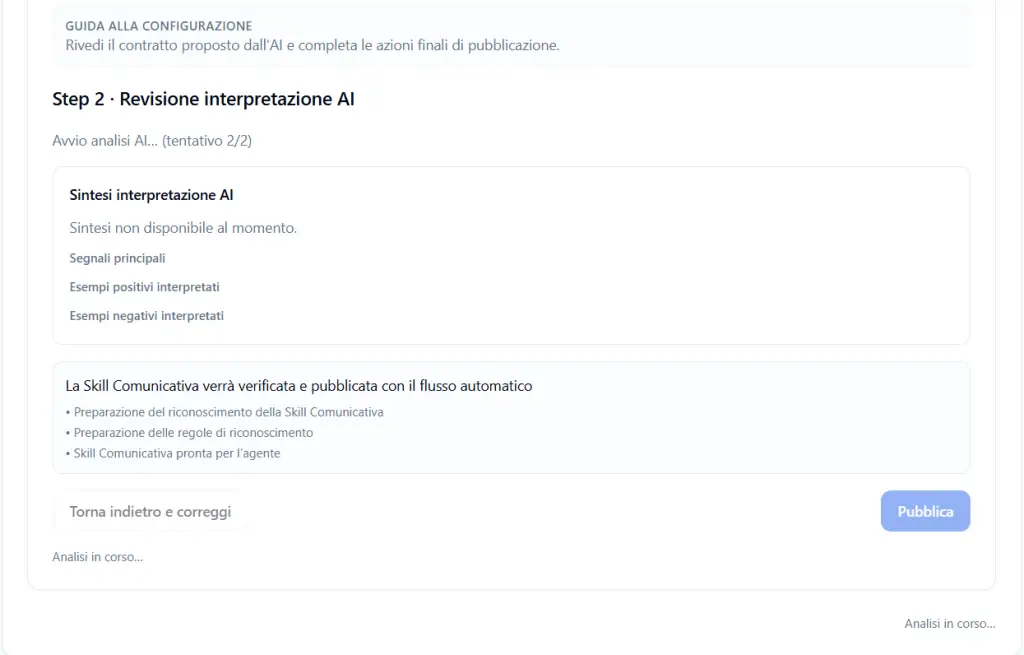
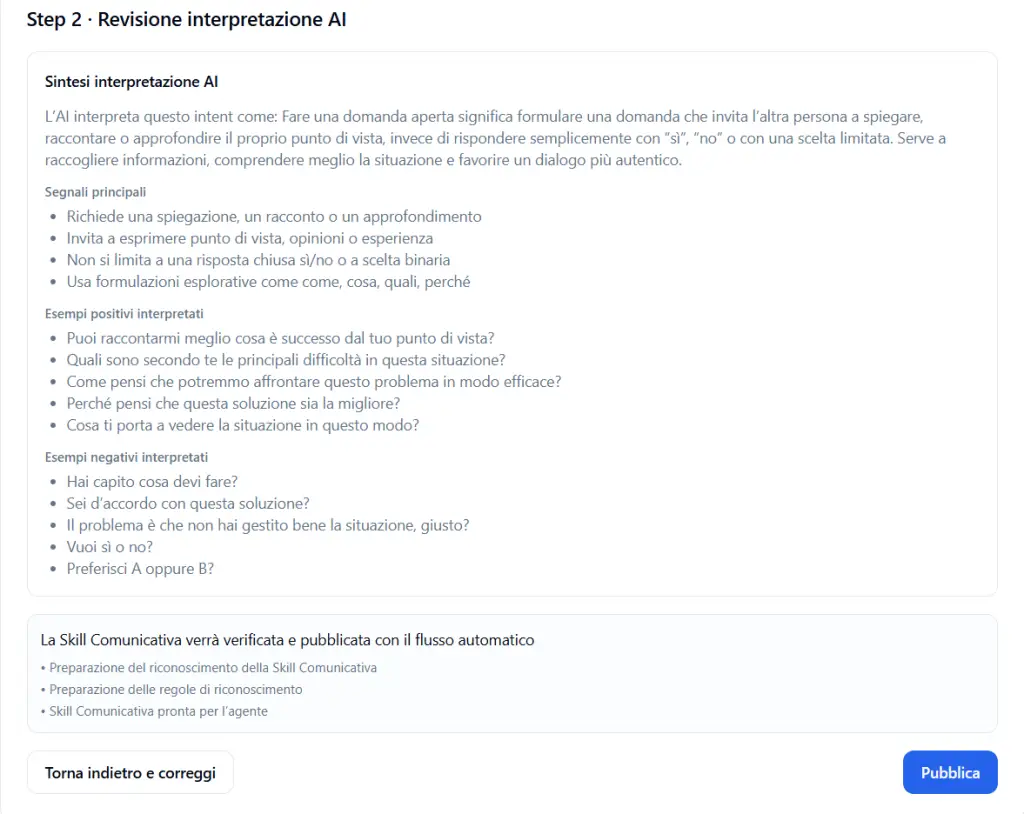
In the second step, the system shows the interpretation generated by the AI based on the data entered.
This phase serves to check that the AI has correctly understood the Communication Skill before publication.
AI Interpretation Summary #
The AI Interpretation Summary section shows an explanation of how the AI interprets the skill.
For example, in the case of the “Open Question” Communication Skill, the AI may interpret it as the ability to formulate questions that invite the other person to explain, tell, or elaborate on their point of view.
Main Signals #
The Main Signals section shows the elements that the AI will use as indicators to recognize the skill.
Example for “Open Question”:
- requires an explanation, a story, or an elaboration;
- invites the expression of point of view, opinions, or experience;
- is not limited to a closed yes/no answer or a binary choice;
- uses exploratory formulations such as “how”, “what”, “which”, “why”.
These signals allow the Tenant Admin to verify if the proposed recognition is consistent with the skill’s objective.
Interpreted Positive Examples #
The Interpreted Positive Examples section shows the phrases that the AI considers consistent with the Communication Skill.
Example:
- Can you tell me more about what happened from your point of view?
- What do you think are the main difficulties in this situation?
- How do you think we could address this problem effectively?
Interpreted Negative Examples #
The Interpreted Negative Examples section shows the phrases that the AI considers not representative of the skill.
Example:
- Do you understand what you need to do?
- Do you agree with this solution?
- The problem is that you didn’t handle the situation well, right?
- Do you want yes or no?
- Do you prefer A or B?
These examples help confirm that the AI can correctly distinguish between valid and invalid phrases.
What to do if the AI interpretation is incorrect #
If the summary, main signals, or interpreted examples are incorrect, click on Go back and correct.
You can modify:
- skill name;
- slug;
- description;
- positive examples;
- negative examples.
After correcting, click Next again to have the AI analysis repeated.
Publishing the Communication Skill #
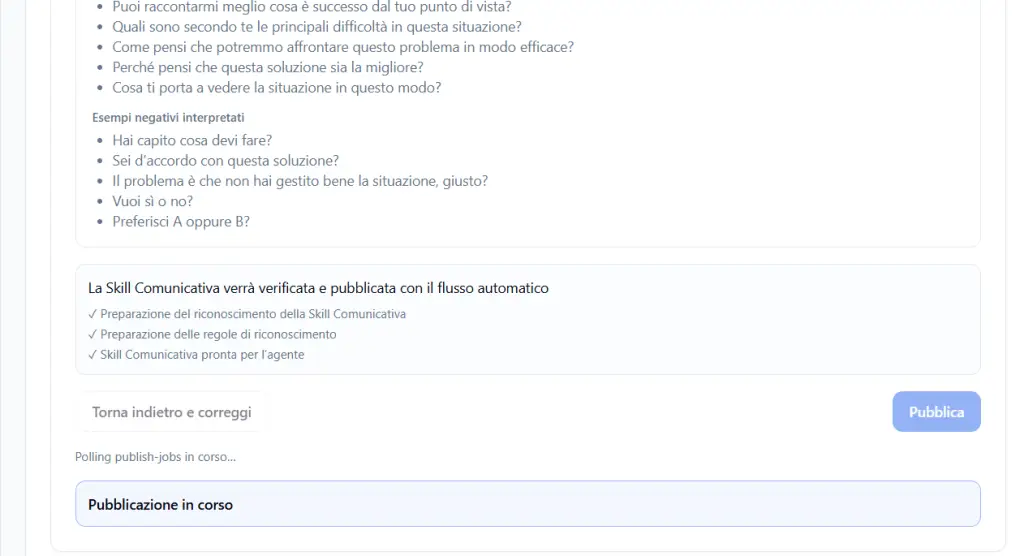
If the AI interpretation is correct, click on Publish.
During publication, the system automatically prepares the Communication Skill for use by the agent.
The screen shows the activities planned by the automatic flow:
- preparation of Communication Skill recognition;
- preparation of recognition rules;
- Communication Skill ready for the agent.
During this phase, messages may appear such as:
- Analysis in progress;
- Starting AI analysis;
- Publishing in progress;
- Polling publish-jobs in progress.
When publication is complete, the Communication Skill becomes available in the main list.
Temporary states during analysis and publication #
During AI analysis or publication, some buttons may be temporarily disabled.
For example:
- the Publish button may not be immediately available;
- the Go back and correct button may be deactivated while the system is processing;
- the AI summary may temporarily show the message “Summary not available at the moment”.
In these cases, it is necessary to wait for the processing to complete.
Best practices for creating effective Communication Skills #
To obtain more precise recognition, it is advisable to:
- use simple and descriptive names;
- write clear and not too generic descriptions;
- insert realistic positive examples;
- insert negative examples useful for distinguishing the skill from similar behaviors;
- avoid phrases that are too long or ambiguous;
- use examples consistent with the type of conversation that will be simulated;
- always check the AI review before publishing.
Complete Example: Open Question #
Name #
Open Question
Slug #
open-question
Description #
Asking an open-ended question means formulating a question that invites the other person to explain, tell, or elaborate on their point of view, instead of simply answering with “yes”, “no”, or a limited choice. It serves to gather information, better understand the situation, and foster a more authentic dialogue.
Phrases that confirm the skill #
Can you tell me more about what happened from your point of view?
What do you think are the main difficulties in this situation?
How do you think we could address this problem effectively?
Phrases that do NOT confirm the skill #
Do you understand what you need to do?
Do you agree with this solution?
The problem is that you didn’t handle the situation well, right?
Final result #
Once published, the Communication Skill is saved and made available to the system.
The agent will be able to use it to recognize, during conversations, whether the participant is demonstrating that specific communication ability or not.


