
What this section is for #
The Clonable Simulations Catalog section allows the Tenant Admin to browse simulations published by the Provider and made available to the tenant.
From this page, the Tenant Admin can import a complete simulation already prepared by the Provider into their own tenant.
Clonable simulations are pre-structured templates and can include:
- guided simulation;
- Player briefing;
- Player objective;
- complete narrative;
- language;
- Avatar Persona;
- any avatar behavior changes;
- Communication Skills;
- Observation Grid;
- grid phases;
- links between phases and skills.
This allows the Tenant Admin to start from ready-made simulations without having to manually create all elements from scratch.
Available provider simulations #
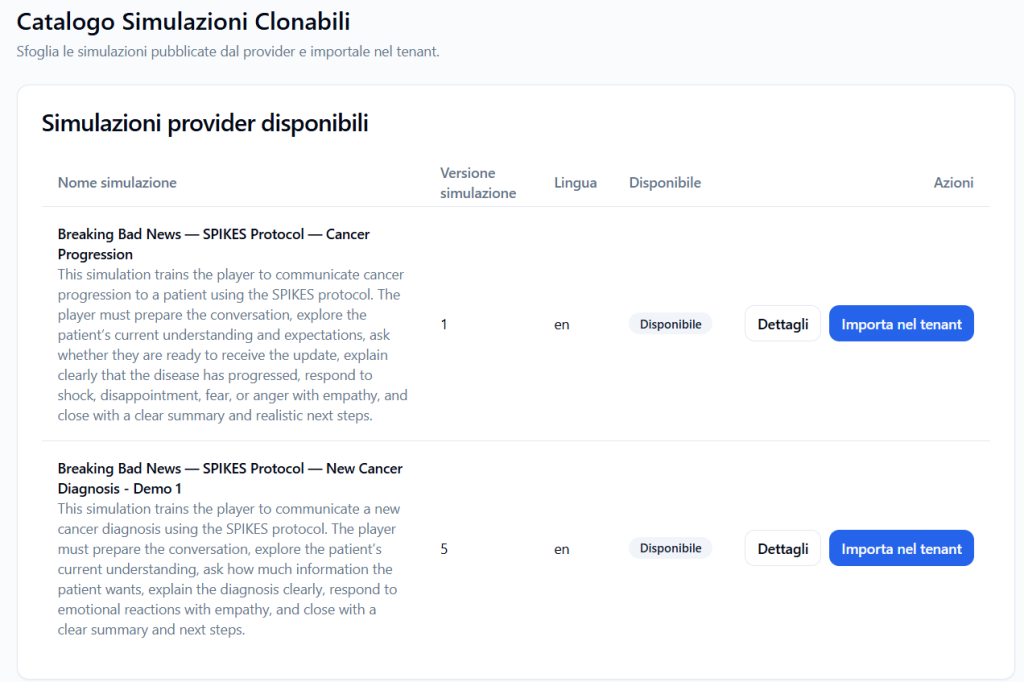
The Available provider simulations section shows the simulations that the Provider has published and made clonable for the tenant.
Each row represents a simulation that can be imported into the tenant.
The main columns are:
Simulation name #
Shows the title of the available simulation.
Example:
Breaking Bad News — SPIKES Protocol — Cancer Progression
A short description of the simulation may be present under the title, useful for quickly understanding the context and the learning objective.
Simulation version #
Shows the numerical version of the simulation.
Example:
1
The version helps distinguish any updates or variants of the same simulation.
Language #
Indicates the primary language of the simulation.
Example:
en
In this case, the simulation is configured in English.
Available #
Indicates if the simulation is available for import.
When the status is Available, the Tenant Admin can proceed to clone the simulation into the tenant.
Actions #
The Actions column allows you to:
- open simulation details;
- import the simulation into the tenant;
- track the import status if cloning is in progress.
Viewing details before importing #
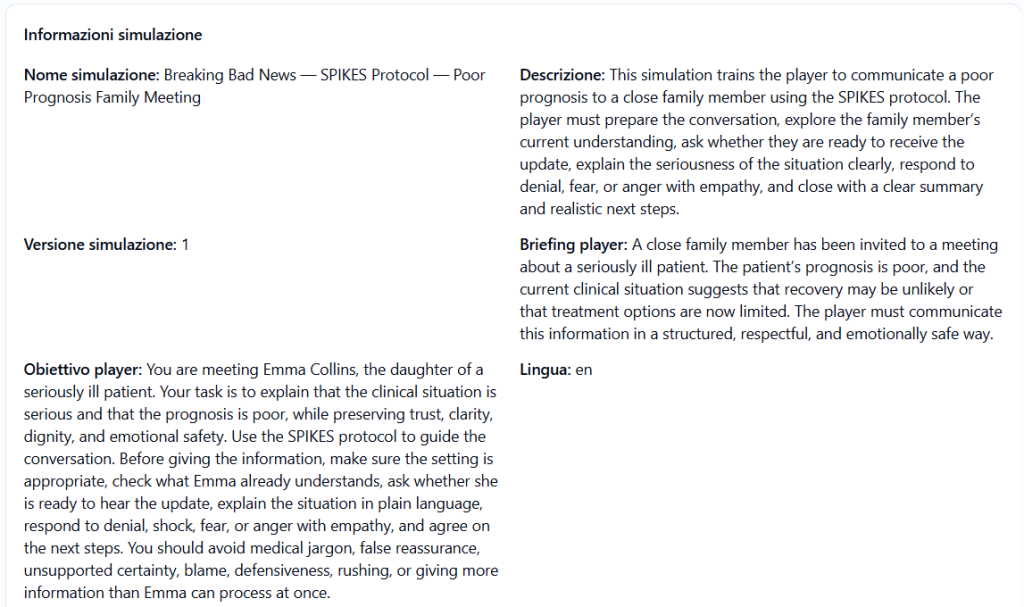
Before importing a simulation, the Tenant Admin can click on Details.
This function allows you to check the content of the simulation before cloning it into the tenant.
In the details, you can verify information such as:
- simulation name;
- description;
- version;
- language;
- Player briefing;
- Player objective;
- Avatar Persona;
- any avatar behavior changes;
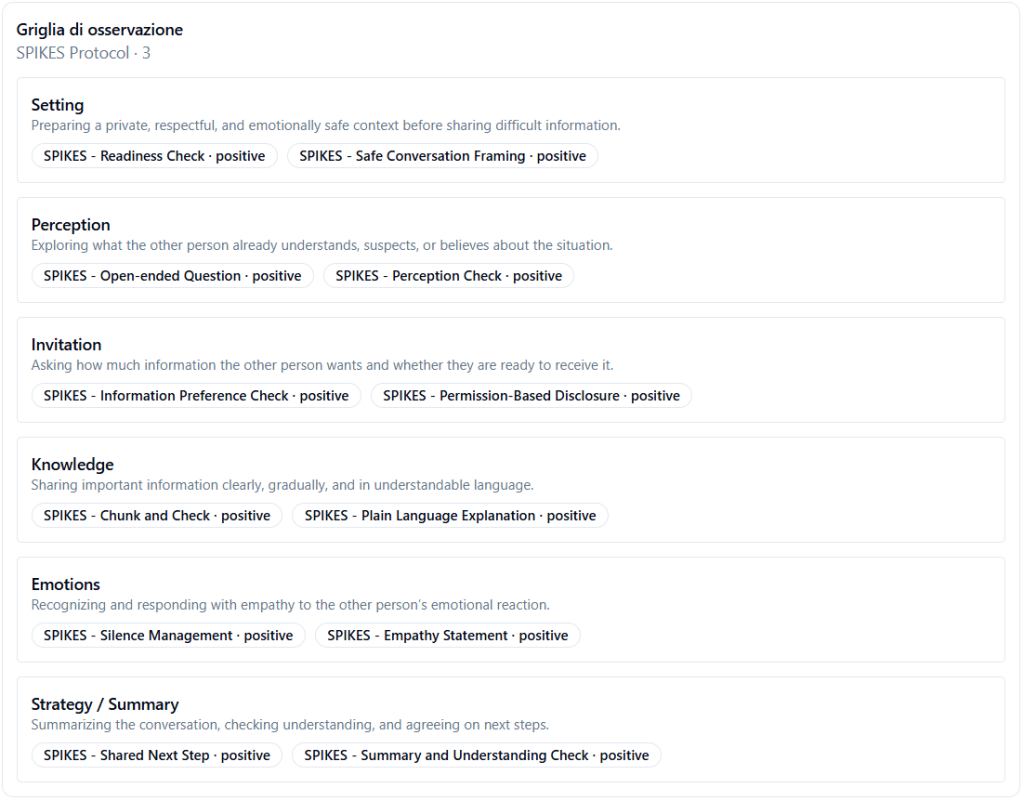
- Observation Grid;
- Communication Skills included.
It is advisable to read the details before importing a simulation to ensure it is consistent with the tenant’s training path.
Importing a simulation into the tenant #
To import a simulation, click on:
Import into tenant
The system starts the process of cloning the simulation from the Provider workspace to the tenant.
The original Provider simulation is not modified.
An independent copy of the simulation is created in the tenant.
What is imported #
When a simulation is imported into the tenant, the system also copies the linked elements necessary for its operation.
The import can include:
- guided simulation content;
- Player briefing and objective;
- narrative;
- language;
- Avatar Persona;
- any target Avatar Personas for behavior changes;
- Observation Grid;
- grid phases;
- Communication Skills;
- associations between phases and skills;
- training configuration planned by the Provider.
This means that the Tenant Admin does not have to manually recreate the Communication Skills or the Observation Grid linked to the simulation: the system takes care of importing them along with the simulation.
Import in progress #
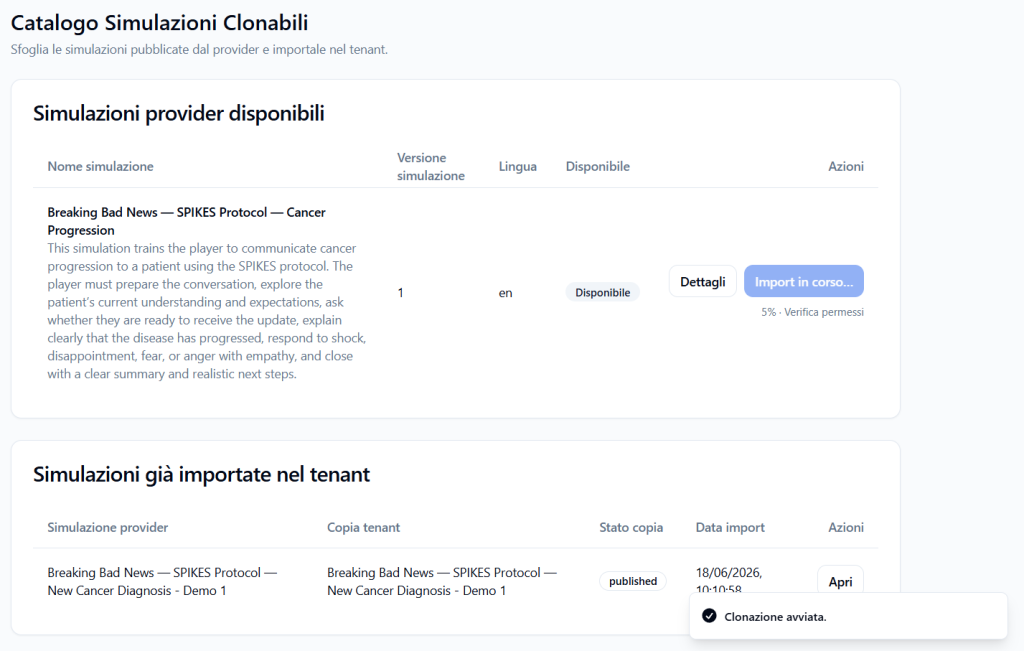
During cloning, a status such as the following may appear:
Import in progress…
The system may also show a progress percentage and the current phase of the process.
Example:
5% · Verifying permissions
This indicates that the platform is checking permissions and preparing the simulation import into the tenant.
During this phase, it is advisable to wait for the process to complete before using the simulation.
Cloning completed #
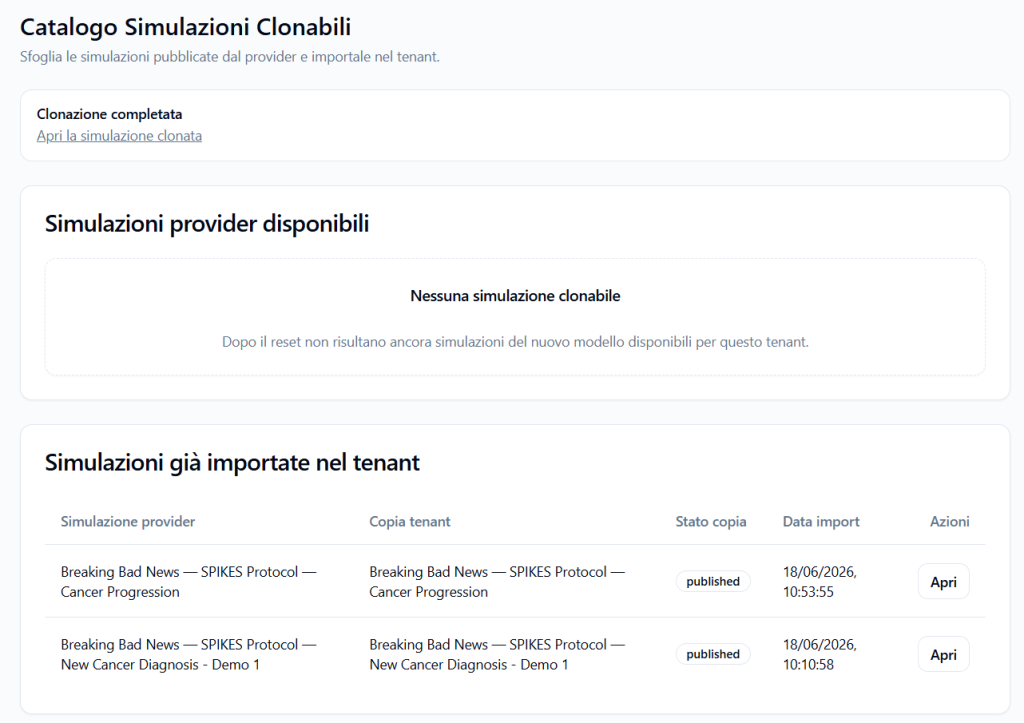
When the import is complete, a message such as the following may appear:
Cloning completed
A link may be available under the message:
Open cloned simulation
By clicking this link, the Tenant Admin can directly open the copy of the simulation imported into the tenant.
Simulations already imported into the tenant #
The Simulations already imported into the tenant section shows the simulations that have already been cloned from the Provider to the tenant.
The table may include:
- original Provider simulation;
- tenant copy;
- copy status;
- import date;
- available actions.
Provider simulation #
Indicates the name of the original simulation published by the Provider.
Example:
Breaking Bad News — SPIKES Protocol — Cancer Progression
Tenant Copy #
Indicates the name of the copy created in the tenant.
The copy may keep the same name as the Provider simulation or have a slightly different name, if required by the import flow or subsequent modifications.
Copy status #
Shows the status of the imported simulation.
Example:
published
This indicates that the tenant copy is published.
Import date #
Shows the date and time the simulation was imported into the tenant.
Actions #
The Open button allows you to open the already imported simulation.
From here, the Tenant Admin can view or manage the tenant copy according to available permissions.
No clonable simulations #
If no simulations are available to import, the section may show a message such as:
No clonable simulations
This means that, at the moment, there are no Provider simulations available for that tenant.
There could be several reasons:
- the Provider has not yet published clonable simulations;
- the Provider has not released simulations for that tenant;
- the available simulations have already been imported;
- there are no simulations compatible with the new model planned by the platform.
In this case, the Tenant Admin can wait for the Provider to make new simulations available.
Difference between Provider simulation and tenant copy #
Provider Simulation #
This is the simulation published by the Provider and made available to tenants.
It represents the starting template.
Tenant Copy #
This is the simulation imported into the tenant.
Once cloned, the copy belongs to the tenant and can be used in the Tenant Admin’s operational flow.
Cloning does not modify the original Provider simulation.
Importing a simulation does not mean making it immediately accessible to Players #
Importing creates a copy of the simulation in the tenant, but does not automatically make it accessible to Players.
After importing, the Tenant Admin must create operational access to the simulation, i.e., a runtime.
The runtime defines:
- which Players can access it;
- Practice or Coaching mode;
- Web or VR channel;
- spoken language;
- voice;
- visual avatar;
- publication and expiration dates;
- maximum number of attempts.
In summary:
- the Provider makes a clonable simulation available;
- the Tenant Admin imports the simulation into the tenant;
- the Tenant Admin creates a runtime/Player access;
- Players see the simulation in their area only if they are authorized and if the runtime is active.
Why use the Clonable Simulations Catalog #
The Clonable Simulations Catalog allows the Tenant Admin to speed up the construction of the training offer.
Instead of manually creating skills, grids, and simulations, the Tenant Admin can import content already prepared by the Provider.
This is useful when the Provider has built standardized, validated, or recommended simulations for specific training paths.
Best practices #
To correctly use the Clonable Simulations Catalog, it is advisable to:
- always read the details before importing;
- verify the language, version, and description of the simulation;
- check that the briefing and objective are suitable for the tenant’s Players;
- verify the included Observation Grid;
- check the linked Communication Skills;
- verify the Avatar Persona and any avatar behavior changes;
- wait for the cloning to complete before opening the simulation;
- check the “Simulations already imported into the tenant” section to avoid unnecessary duplication;
- remember that after importing, a runtime needs to be created to make the simulation accessible to Players.
Final result #
The Clonable Simulations Catalog section allows the Tenant Admin to import complete simulations published by the Provider into the tenant.
The system takes care of cloning the simulation and linked elements, such as Communication Skills, Observation Grids, Avatar Personas, and narrative.
After importing, the simulation becomes available in the tenant as an independent copy.
To make it usable by Players, the Tenant Admin will then need to create a dedicated runtime or Player access.


