
What this section is for #
The Observation Grid section allows the Provider to create, manage, and clone observation grids to use in simulations.
An Observation Grid defines which phases of the conversation should be observed and which Communication Skills should be detected in each phase.
The Provider can build a grid in two ways:
- creating it from scratch, when they need a grid specific to their training context;
- cloning it from the global catalog, when a grid suitable for their objectives is already available in the platform library.
Observation Grids created or cloned #
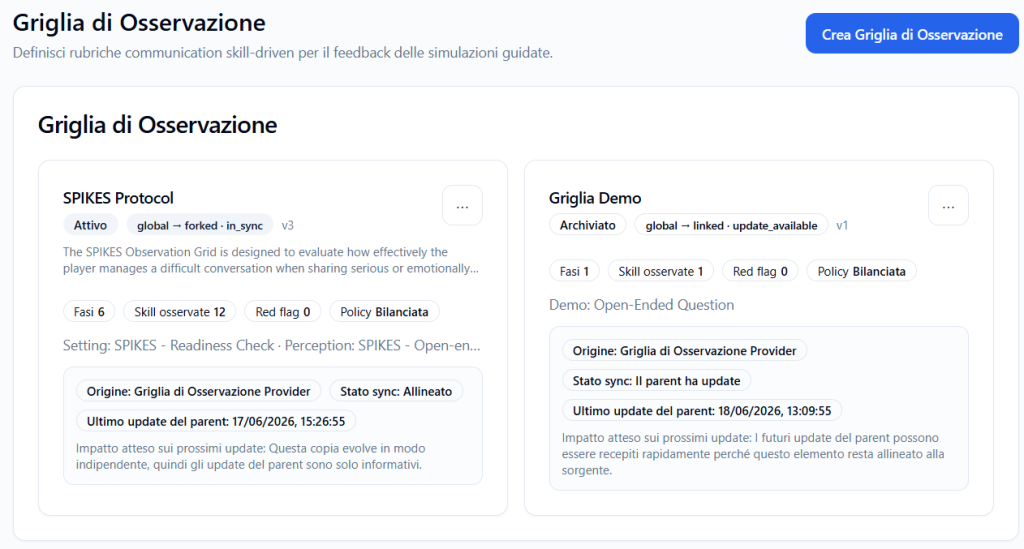
The main part of the page displays the grids already available in the Provider catalog.
Each grid is displayed as a card with summary information.
The sheet can show:
- grid name;
- status;
- origin;
- synchronization status;
- version;
- number of phases;
- number of observed Communicative Skills;
- associated policy;
- preview of phases and skills;
- last update of the parent;
- expected impact on future updates.
Grid status #
The status indicates whether the grid is usable or archived.
Examples:
- Active
- Archived
An active grid can be used in simulations.
An archived grid remains in the history, but is normally not proposed for new operational uses.
Grid origin #
The grid can have different origins.
Examples:
- Provider Observation Grid
- Global Observation Grid
When a grid derives from the global catalog, information about the relationship with the global parent may appear on the card.
Sync status #
The sync status indicates whether the Provider copy is aligned or not with the original grid from which it derives.
Examples:
- Aligned
- Parent has updates
- in_sync
- update_available
If the grid is aligned, it means there are no significant differences from the source.
If the parent has updates, it means the global or source version has received subsequent updates.
Version #
The version indicates the grid’s version number.
Example:
v3
The version helps distinguish successive updates of the same grid.
Observed phases and skills #
Each grid can display badges such as:
- Phases 6
- Observed skills 12
- Red flags 0
- Balanced Policy
This data allows you to quickly understand the grid’s complexity.
For example, a grid with 6 phases and 12 observed skills is more structured than a grid with 1 phase and 1 observed skill.
Available actions on Provider grids #
Each card may have a three-dot menu.
Available actions may include:
Edit #
Allows you to modify the Provider grid.
This function is useful when the Provider wants to adapt phases, descriptions, or Communication Skills to their training objectives.
Archive #
Allows you to archive the grid.
Archiving a grid means removing it from primary operational use, while keeping it available as history or reference.
Creating an Observation Grid from scratch #
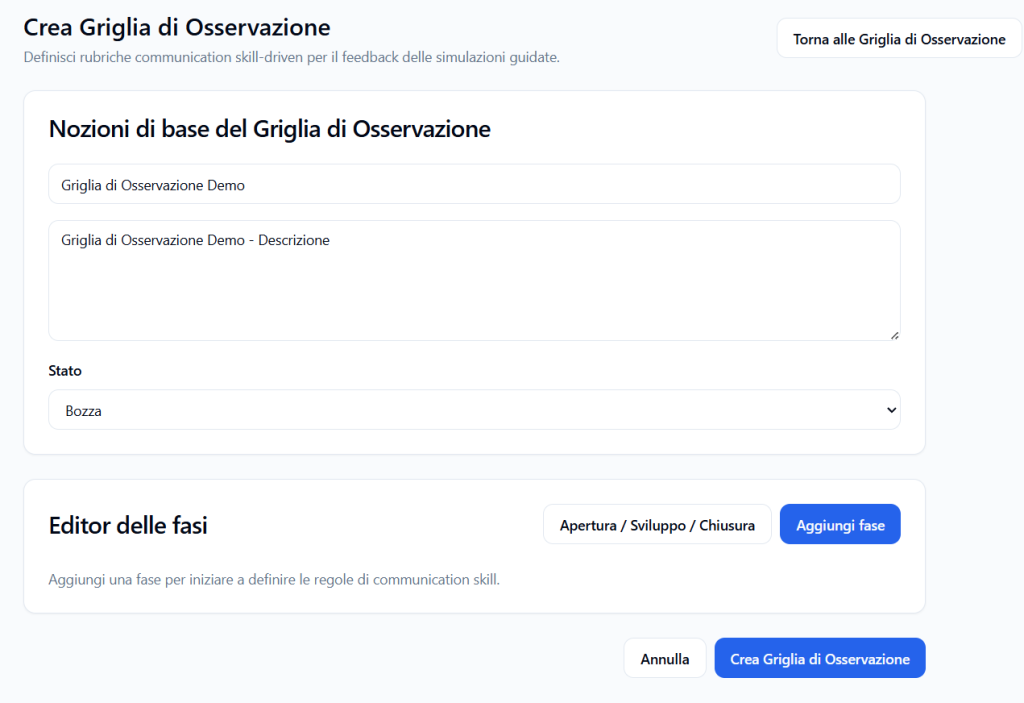
The Create Observation Grid button allows the Provider to create a new grid manually.
This option is useful when the Provider wants to build a completely customized rubric.
During creation, the Provider can define:
- grid name;
- description;
- status;
- conversation phases;
- Communication Skills to observe in each phase.
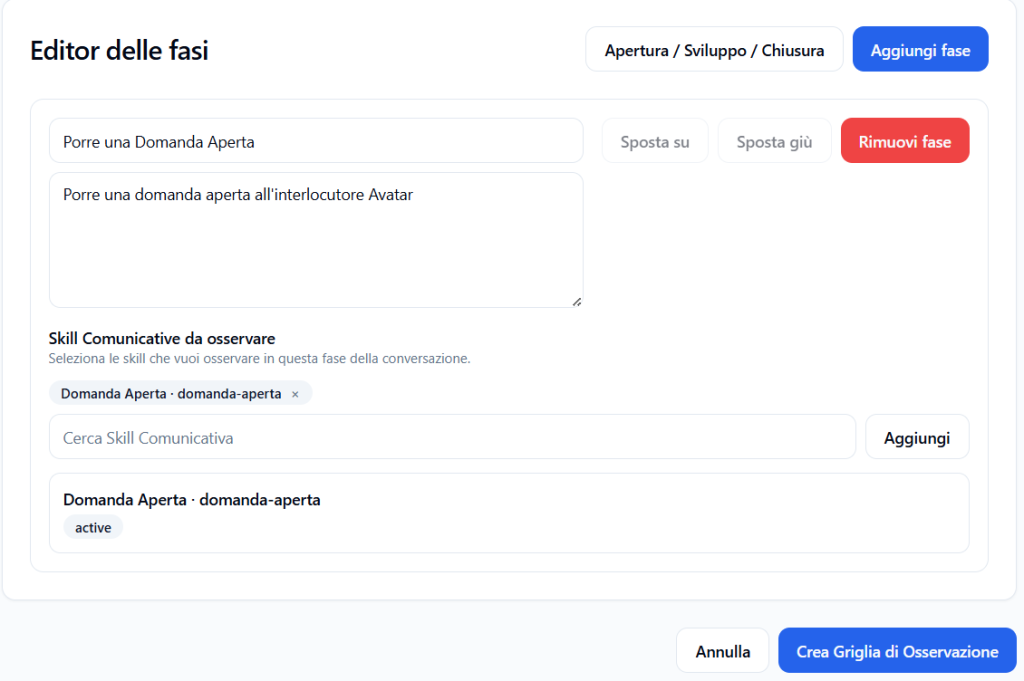
Creating from scratch is recommended when there is no global grid already suitable for the desired use case.
Global Observation Grids Catalog #
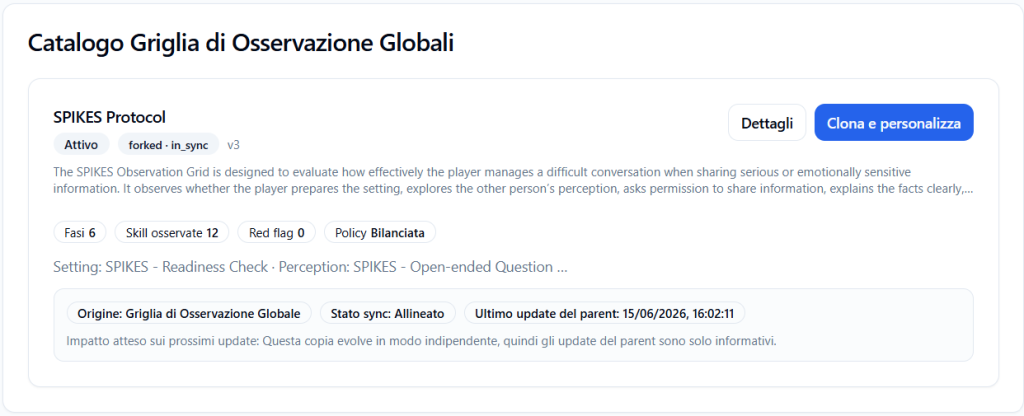
The Global Observation Grid Catalog section displays the global grids made available by the platform.
These grids are ready-made templates to consult, clone, and customize.
Each global grid may include:
- phase structure;
- phase descriptions;
- included Communication Skills;
- examples of phrases that confirm the skills;
- examples of phrases that do not confirm the skills;
- observation policy;
- version;
- status;
- global origin.
Viewing details before cloning #
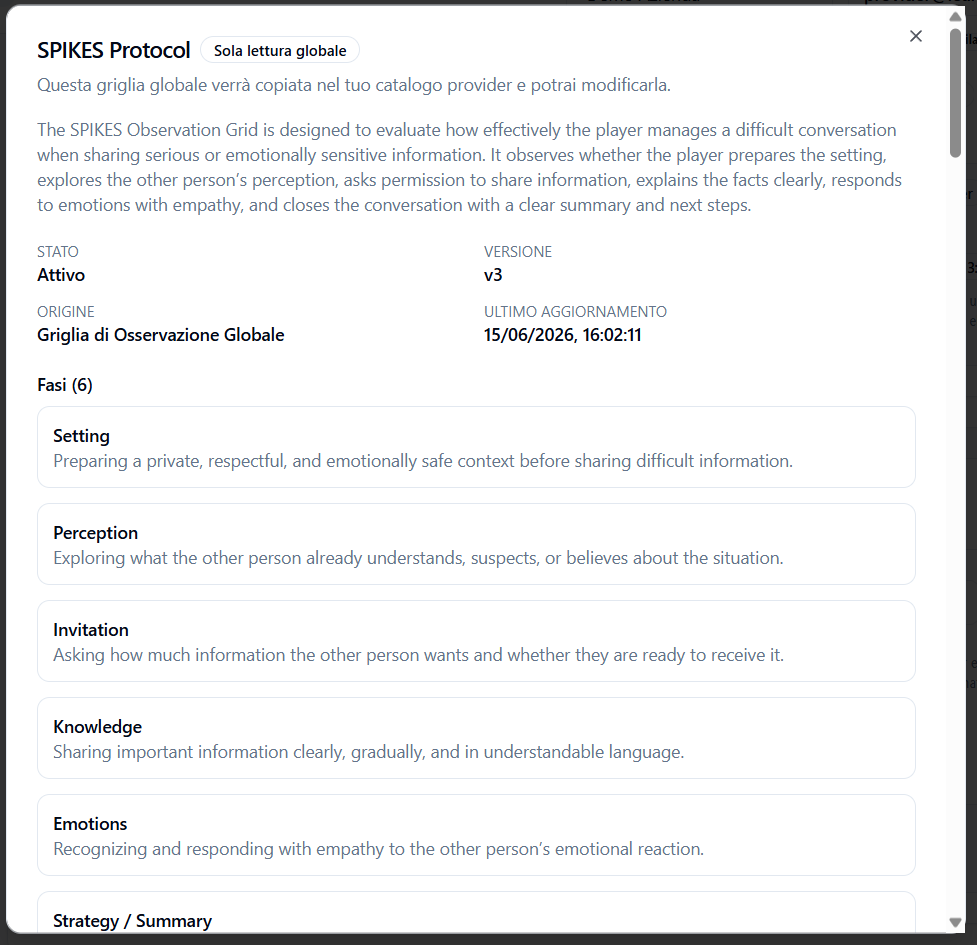
Before cloning a global grid, the Provider can click on Details.
The detail window displays a read-only view of the global grid.
This allows you to understand whether the grid is consistent with the training objectives before copying it to the Provider catalog.
The details may show:
- grid name;
- description;
- status;
- version;
- origin;
- last update;
- included phases;
- Communication Skills included.
Grid phases #
The phases section shows the conversation structure provided by the grid.
Example for a SPIKES grid:
- Setting
- Perception
- Invitation
- Knowledge
- Emotions
- Strategy / Summary
Each phase describes a specific moment in the conversation and indicates which part of the Player’s behavior should be observed.
Included Communication Skills #
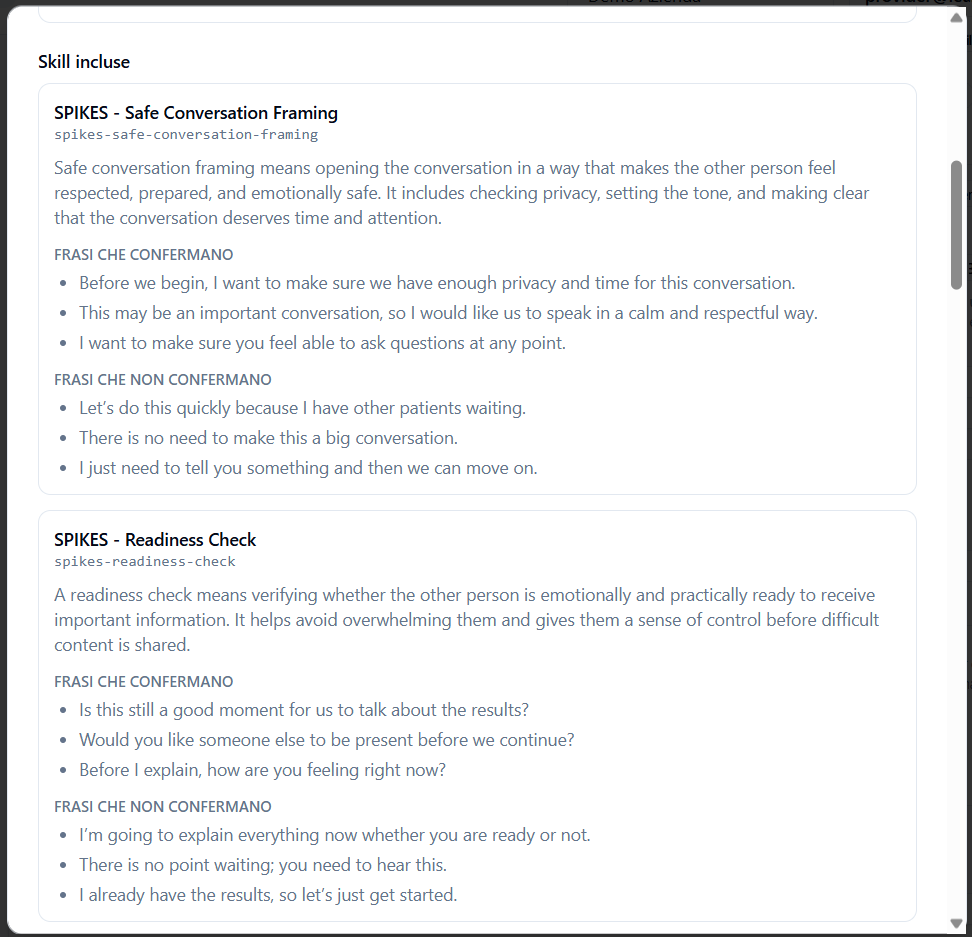
The detail window also displays the Communication Skills included in the grid.
For each skill, the following may be shown:
- skill name;
- technical slug;
- description;
- phrases that confirm the skill;
- phrases that do not confirm the skill.
Example:
SPIKES – Safe Conversation Framing
This skill observes whether the Player opens the conversation in a respectful, prepared, and emotionally safe manner.
Confirming phrases:
- “Before we begin, I want to make sure we have enough privacy and time for this conversation.”
- “This may be an important conversation, so I would like us to speak in a calm and respectful way.”
- “I want to make sure you feel able to ask questions at any point.”
Non-confirming phrases:
- “Let’s do this quickly because I have other patients waiting.”
- “There is no need to make this a big conversation.”
- “I just need to tell you something and then we can move on.”
This preview helps the Provider verify not only the grid’s structure, but also the quality of the skills that will be imported.
Cloning and customizing a global grid #
If the global grid is suitable for the Provider’s objectives, you can click on:
Clone and customize
This action copies the global grid to the Provider catalog.
The Provider copy can then be modified and adapted.
The original global grid remains unchanged.
What is cloned #
When the Provider clones a global Observation Grid, the system also imports the Communication Skills contained in the grid.
Cloning can include:
- observation grid;
- conversation phases;
- phase descriptions;
- associated Communication Skills;
- skill descriptions;
- positive examples;
- negative examples;
- observation configurations;
- links between phases and skills.
This means the Provider does not have to manually recreate the included Communication Skills: the system brings them along during cloning.
Difference between global grid and Provider copy #
Global grid #
It is the original template provided by the platform.
It can be consulted in read-only mode and represents a validated or proposed base from the global library.
Provider copy #
It is the version cloned in the Provider catalog.
After cloning, the Provider can customize it based on their training objectives.
The Provider copy can be used in the Provider’s simulations and, if planned, made available to tenants.
When to create a grid from scratch #
Creating a grid from scratch is useful when:
- the Provider has a proprietary framework;
- the conversation phases are specific to their method;
- the required Communication Skills are not present in the global catalog;
- the simulation is very vertical;
- the Provider wants to build a completely customized rubric.
Examples:
- grid for internal leadership;
- grid for customer care;
- grid for corporate compliance;
- grid for specific doctor-patient communication;
- grid for consultative sales;
- grid for managerial feedback.
When to clone a global grid #
Cloning a global grid is useful when a template consistent with the training objective already exists.
This option saves time and allows you to start from an already organized structure.
It is advisable to clone a global grid when:
- the framework is already suitable;
- the phases are consistent with the simulation;
- the included Communication Skills are relevant;
- the grid description matches the use case;
- the Provider wants to customize only some elements without starting from scratch.
Practical example #
The Provider wants to create a simulation to train the communication of difficult news in healthcare.
In the global catalog they find the grid:
SPIKES Protocol
Before cloning it, they open Details and verify:
- SPIKES phases;
- grid description;
- included Communication Skills;
- positive and negative examples;
- version;
- status.
If the grid is consistent with the training path, they click on:
Clone and customize
The system copies the grid to the Provider catalog along with the contained Communication Skills.
At that point the Provider can adapt it or use it in their simulations.
Best practices #
To properly manage Provider Observation Grids, it is advisable to:
- check whether a suitable global grid already exists before creating one from scratch;
- always open the details before cloning;
- verify the grid’s phases;
- read the included Communication Skills;
- check positive and negative examples of the skills;
- clone only truly useful grids;
- customize the Provider copy when it needs to be adapted to your context;
- archive grids that are no longer used;
- verify the sync status when the grid derives from a global source;
- use grids consistent with the simulation’s objectives.
Final result #
As a Provider, you can create Observation Grids from scratch or clone them from the global catalog.
Cloning allows you to start from an already structured grid and also brings along all the Communication Skills contained in the grid.
Before cloning, you can view the details to verify phases, descriptions, included skills, and examples.
After cloning, the grid becomes a customizable Provider copy, usable in simulations and training paths managed by the Provider.


