
What this section is for #
The Observation Grid section allows the Tenant Admin to create an evaluation rubric based on Communication Skills.
The grid is used to define which communication skills should be observed during different phases of a guided simulation. This way, the system can analyze the conversation and produce more structured feedback regarding expected communication behaviors.
An Observation Grid can be used, for example, to establish that during a simulation the participant must:
- open the conversation correctly;
- ask open-ended questions;
- demonstrate active listening;
- ask for clarification;
- propose a solution;
- close the conversation with an agreement or next step.
Accessing the section #
From the side menu, enter the Tenant Administrator area and select Observation Grids.
From this section you can create a new grid, modify its main information, and define the conversation phases that will be observed during the simulation.
Create a new Observation Grid #
To create a new grid, access the Create Observation Grid page.
The screen consists of two main areas:
- Observation Grid Basics
- Phase Editor
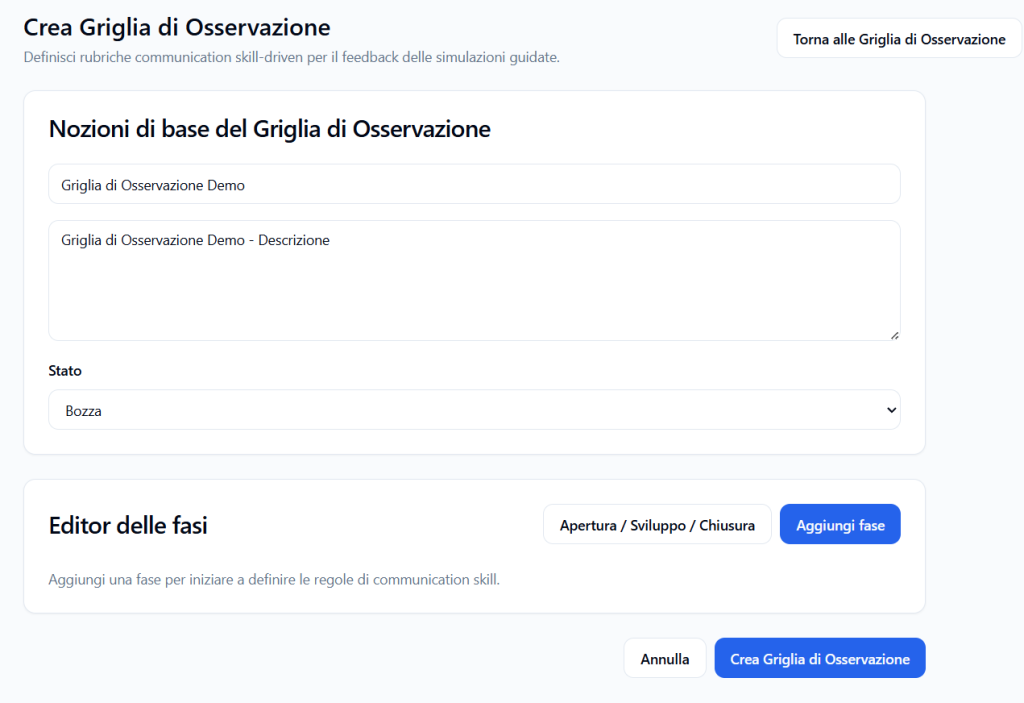
Observation Grid Basics #
This section defines the general information of the grid.
Observation Grid Name #
Enter a clear and recognizable name.
Example:
Demo Observation Grid
The name should help the administrator quickly understand which type of simulation, pathway, or training objective the grid is linked to.
Description #
In the description field you can explain the purpose of the grid.
Example:
Demo Observation Grid – Description
The description can indicate:
- which communication behavior you want to observe;
- for which type of simulation the grid will be used;
- which competencies will be evaluated;
- which training objective it supports.
Status #
The Status field indicates the current condition of the grid.
In the example shown, the status is Draft.
The Draft status indicates that the grid is still in preparation and can be completed before operational use.
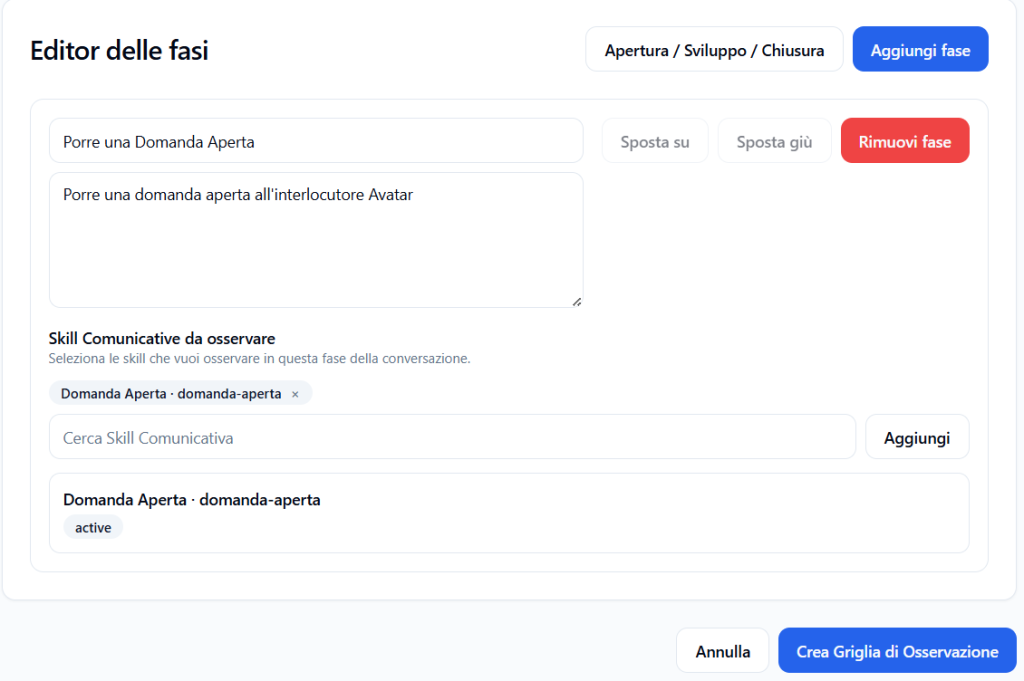
Phase Editor #
The Phase Editor allows you to build the structure of the conversation to be observed.
A phase represents a specific moment in the simulation. Each phase can have a name, a description, and one or more Communication Skills to observe.
Examples of phases can be:
- Opening;
- Development;
- Closing.
The grid can therefore indicate which skills should be observed at each moment of the conversation.
Add a phase #
To add a new phase, click on Add Phase.
You can use the Opening / Development / Closing template to create a basic conversation structure.
After adding a phase, the screen shows the fields to complete.
Phase Name #
In the first field, enter the phase name.
Example:
Ask an Open-Ended Question
The name should concisely describe the objective of the phase.
Phase description #
In the description field, explain what should happen in that phase of the conversation.
Example:
Ask an open-ended question to the Avatar interlocutor
The description helps clarify the expected behavior from the participant during that phase of the simulation.
Communication Skills to observe #
The Communication Skills to observe section allows you to associate one or more Communication Skills already present in the system with the phase.
These skills represent the behaviors that the system will observe during that specific phase.
Example:
Open-Ended Question · open-ended-question
In this case, during the selected phase, the system will observe whether the participant is able to ask an open-ended question to the Avatar interlocutor.
Search for a Communication Skill #
To add a skill to the phase:
- click in the Search Communication Skill field;
- type the name or part of the name of the skill;
- select the desired skill;
- click on Add.
The selected skill is displayed within the phase.
Remove a Communication Skill from the phase #
When a skill has been added to the phase, it is displayed as a label.
To remove it, click on the x next to the skill name.
The skill is removed only from that phase of the grid, but is not deleted from the general Communication Skills catalog.
Check the Communication Skill status #
Below the selected skill, the skill status may be shown.
Example:
active
The active status indicates that the Communication Skill is active and available to be used in the grid.
Manage the order of phases #
Each phase can be moved within the grid.
The available buttons are:
- Move Up
- Move Down
These buttons allow you to modify the order of phases, so as to correctly represent the conversation sequence.
For example, a grid could follow this order:
- Opening the conversation;
- Exploring the problem;
- Proposing a solution;
- Closing and final agreement.
Remove a phase #
To delete a phase from the grid, click on Remove Phase.
Removal deletes that phase from the grid under construction.
Before removing a phase, verify that it does not contain information or Communication Skills that are still useful.
Create the Observation Grid #
After completing the main information and configuring at least one phase, click on Create Observation Grid.
The system saves the grid with:
- name;
- description;
- status;
- configured phases;
- Communication Skills associated with each phase.
Once created, the grid can be used to link the observation of Communication Skills to guided simulations.
Cancel creation #
To exit without saving the new grid, click on Cancel.
This action interrupts the grid creation and returns the user to the previous screen.
Return to the Observation Grids list #
The Back to Observation Grids button allows you to return to the list of grids already present in the system.
Use this button if you want to leave the creation screen or consult existing grids.
Best practices for creating an effective Observation Grid #
To build a clear and useful grid, it is advisable to:
- give the grid a recognizable name;
- write a description that explains the purpose of the evaluation;
- divide the conversation into simple and observable phases;
- associate with each phase only the Communication Skills that are truly relevant;
- avoid overly generic phases;
- verify that the selected Communication Skills are active;
- maintain an order consistent with the conversation flow;
- use concrete descriptions, oriented toward what the participant must do.
Complete example #
Grid name #
Demo Observation Grid
Description #
Grid used to observe the participant’s ability to ask an open-ended question during a guided simulation.
Status #
Draft
Phase #
Ask an Open-Ended Question
Phase description #
Ask an open-ended question to the Avatar interlocutor.
Associated Communication Skill #
Open-Ended Question · open-ended-question
Expected result #
During this phase, the system will observe whether the participant formulates a question that invites the Avatar interlocutor to explain, narrate, or elaborate on their point of view, instead of simply answering with “yes,” “no,” or with a limited choice.
Final result #
Once created, the Observation Grid becomes a reference structure for simulation feedback.
The system will be able to use the Communication Skills associated with the various phases to observe the participant’s behavior and provide clearer, more consistent feedback linked to the conversation objectives.


