
What this section is for #
The My Reports section allows the Player to review completed sessions and consult the reports generated after the simulations.
The report helps the Player understand:
- how the conversation went;
- which communicative behaviors emerged;
- which skills were detected;
- which areas can be strengthened;
- which next steps are recommended;
- how their conversational profile evolves over time.
The report is not intended as a personal judgment, but as a training tool to clarify what happened during the simulation and how to improve in subsequent attempts.
Privacy protection #
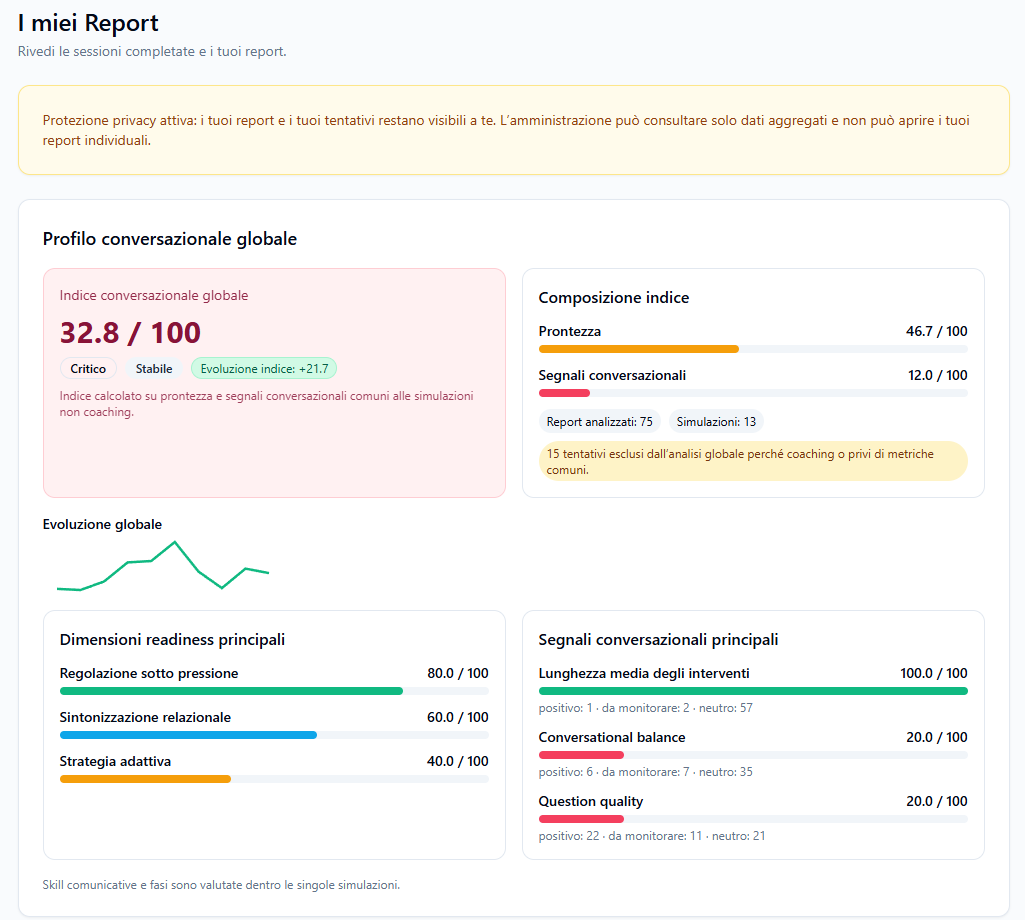
A privacy message may be displayed at the top.
Example:
Privacy protection active: your reports and attempts remain visible only to you. Administration can only consult aggregated data and cannot open your individual reports.
This means that:
- the Player can see their own individual reports;
- the Tenant Admin cannot open the Player’s personal reports;
- administration can only consult aggregated data;
- individual performance remains protected.
This setting serves to guarantee confidentiality and security when using the platform.
This type of protection can be requested directly from the Provider managing the Tenant to which the Player belongs.
Global conversational profile #
The Global Conversational Profile section shows an overall summary of the Player’s performance in the simulations carried out.
This view aggregates available reports and provides a general index.
Global conversational index #
The Global conversational index shows an overall score out of 100.
Example:
32.8 / 100
The score may be accompanied by labels such as:
- Critical;
- To be strengthened;
- Stable;
- Positive index evolution;
- Insufficient data.
This index represents a summary of the Player’s conversational profile, calculated on the common metrics available.
Index composition #
The Index Composition section shows which elements contribute to the global score.
Examples:
- Readiness
- Conversational signals
Each element is shown with a score out of 100.
The composition helps the Player understand if the result depends more on communicative readiness, conversational signals, or other available elements.
Analyzed reports and simulations #
The section can indicate how many reports and how many simulations were considered in the calculation.
Example:
- Analyzed reports: 75
- Simulations: 13
A message may also appear indicating that some attempts have been excluded from the global analysis.
Example:
15 attempts excluded from the global analysis because they were coaching sessions or lacked common metrics.
This means that not all attempts always enter the global index. Some may be excluded because they belong to coaching paths or because they do not contain all the metrics required for comparison.
Global evolution #
The Global Evolution section shows the Player’s progress over time.
When enough valid reports are present, a graph is shown that allows you to observe if the index is improving, worsening, or remaining stable.
If there is insufficient data, a message may appear inviting you to complete at least two valid reports to see the evolution.
Main readiness dimensions #
The Main Readiness Dimensions section shows the most relevant areas of communicative readiness.
Examples:
- Regulation under pressure;
- Relational tuning;
- Adaptive strategy;
- Sensemaking & Clarity.
Each dimension has a score out of 100.
This section helps the Player understand which aspects of their communication are most solid and which can be improved.
Main conversational signals #
The Main Conversational Signals section shows the most recurring signals that emerged in the conversations.
Examples:
- average length of interventions;
- conversational balance;
- question quality;
- sentence fragmentation;
- theme coherence;
- linguistic stress indicators.
For each signal, the following can be shown:
- score;
- positive signals;
- signals to monitor;
- neutral signals.
This data helps the Player better understand the communicative style that emerged in the simulations.
Note on skills and phases #
A note such as the following may appear in the global profile:
Communicative skills and phases are evaluated within individual simulations.
This means that some evaluations depend on the specific simulation performed and are not always aggregated in the global profile.
Skills and phases should therefore be read primarily within the report of the single session.
Single session report #
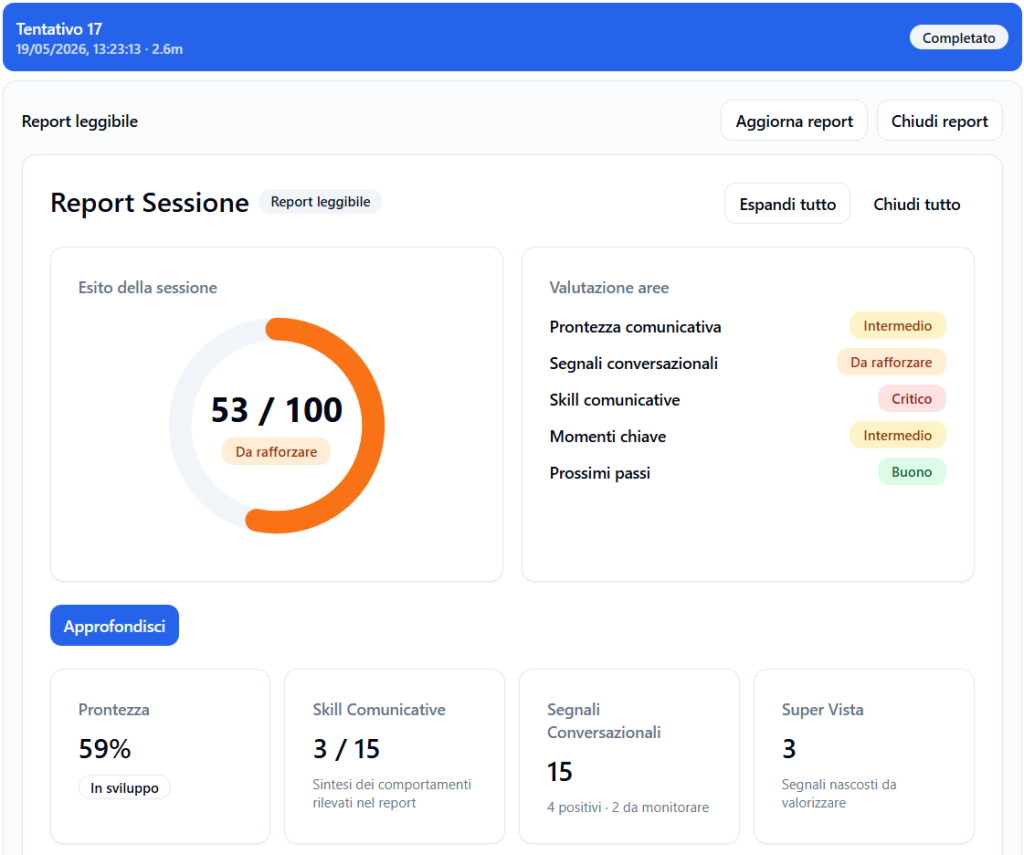
When a Player opens an attempt, the Readable Report of the session is shown.
At the top there is a bar with:
- attempt number;
- date and time;
- session duration;
- attempt status.
Example:
Attempt 17
05/19/2026, 1:23:13 PM · 2.6m
Completed
Readable report #
The Readable Report is the training version of the report.
It shows a clear summary of the session and allows you to delve into the different areas analyzed.
It can include:
- session outcome;
- area evaluation;
- communicative readiness;
- communicative skills;
- conversational signals;
- Super View;
- post-session evaluation;
- what worked;
- development areas;
- recommended next steps;
- conversation map;
- key moments;
- interruptions.
Update report #
The Update report button allows you to regenerate or update the report when new data is available.
This can be useful if the report has just been produced or if some sections are not yet complete.
Close report #
The Close report button closes the report view and returns to the previous page.
Expand all and Close all #
The Expand all and Close all buttons allow you to quickly open or close all sections of the report.
These are useful when you want to read the full report or consult only a specific part.
Session outcome #
The Session outcome section shows the overall score of the attempt.
Example:
53 / 100
The score may be accompanied by a status, for example:
- Critical;
- To be built;
- To be strengthened;
- In development;
- Intermediate;
- Adequate;
- Good.
This value offers a general summary of the session’s progress.
Area evaluation #
The Area Evaluation section shows the status of the main areas analyzed.
Examples:
- Communicative readiness;
- Conversational signals;
- Communication skills;
- Key moments;
- Next steps.
Each area can have a label, such as:
- Critical;
- To be strengthened;
- Intermediate;
- In development;
- Good;
- Adequate.
This view allows you to quickly understand which aspects are most solid and which require attention.
Post-session evaluation #
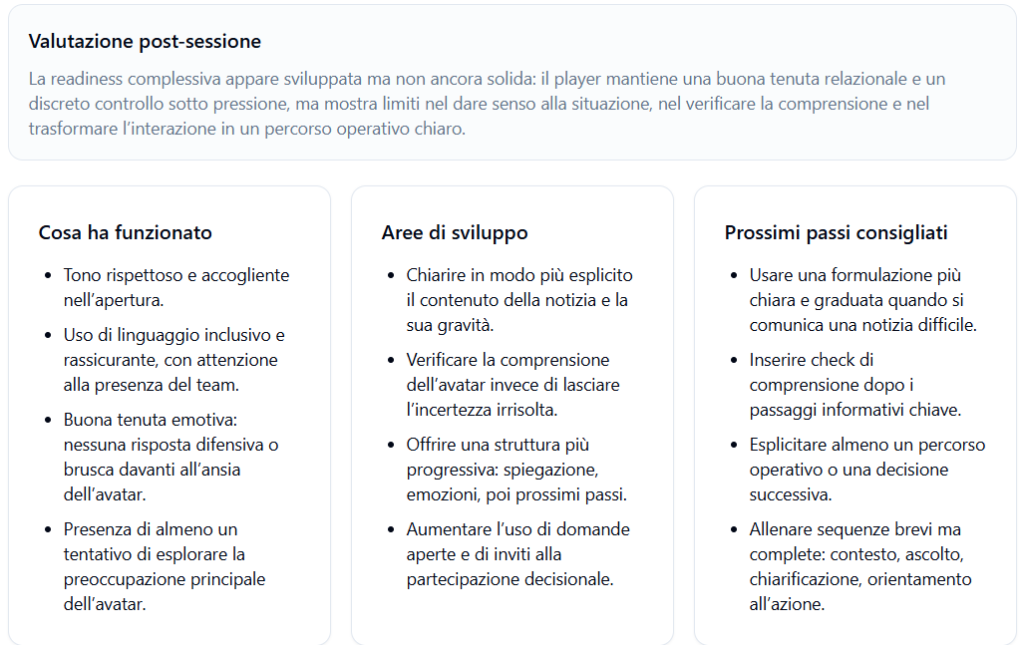
The Post-session Evaluation section offers a narrative summary of the conversation.
Example:
Overall readiness appears developed but not yet solid: the player maintains good relational stability and decent control under pressure, but shows limits in making sense of the situation, verifying understanding, and transforming the interaction into a clear operational path.
This part translates the report data into a more understandable and learning-oriented reading.
What worked #
The What worked section shows the positive behaviors that emerged in the session.
Examples:
- respectful and welcoming tone in the opening;
- use of inclusive and reassuring language;
- good emotional stability;
- presence of at least one attempt to explore the avatar’s main concern.
This section helps the Player recognize what to maintain in subsequent attempts.
Development areas #
The Development Areas section shows aspects to improve.
Examples:
- clarify the content of the news and its severity more explicitly;
- verify the avatar’s understanding;
- offer a more progressive structure;
- increase the use of open questions and invitations to decision-making participation.
This section helps the Player transform the report into a concrete improvement plan.
Recommended next steps #
The Recommended Next Steps section proposes practical actions to apply in subsequent attempts.
Examples:
- use a clearer and more graduated formulation;
- insert comprehension checks after key informative steps;
- explicitly state an operational path or a subsequent decision;
- practice short but complete sequences: context, listening, clarification, action orientation.
These suggestions help the Player know exactly what to focus on in the next training session.
Communication Readiness Dimensions #
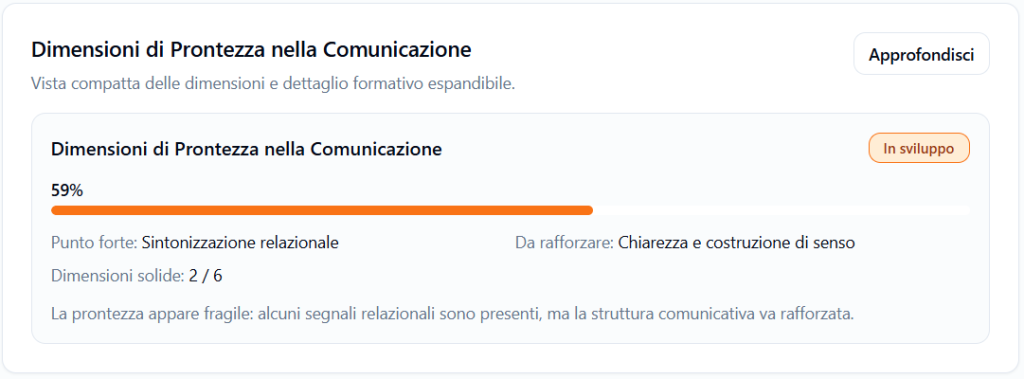
The Communication Readiness Dimensions section shows a compact view of communicative readiness.
It can include:
- percentage score;
- status;
- strong point;
- area to strengthen;
- solid dimensions;
- short training summary.
Example:
- 59%
- Strong point: Relational tuning
- To be strengthened: Clarity and sense-making
- Solid dimensions: 2 / 6
The Learn more button allows you to open more details.
Conversational Signals #
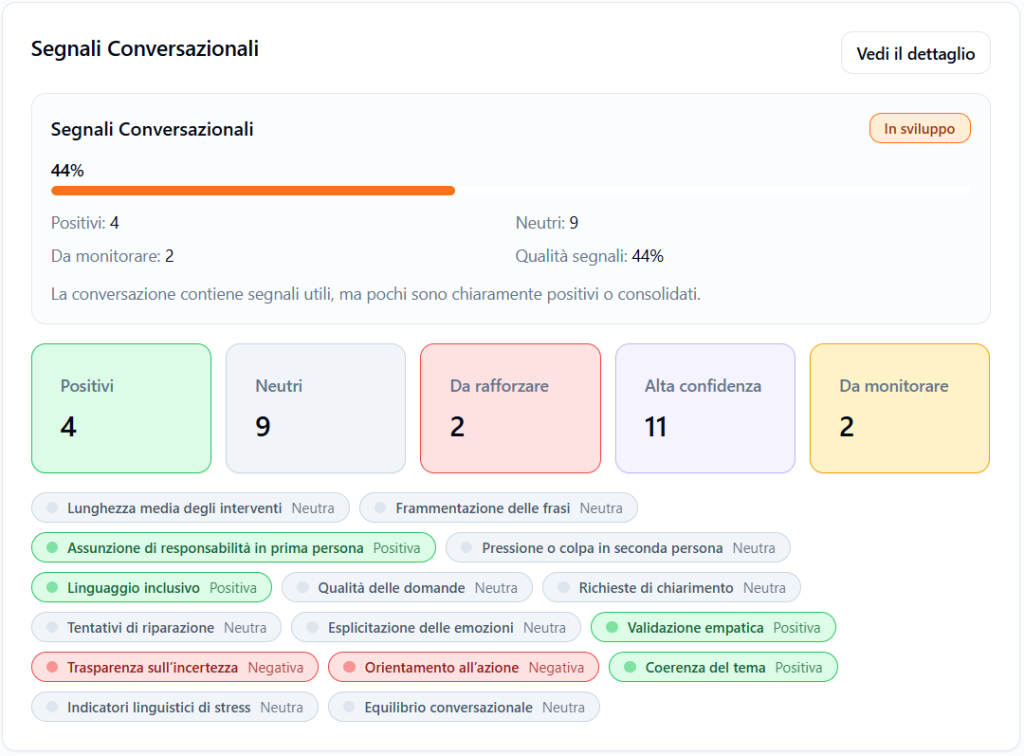
The Conversational Signals section shows the quality of the signals that emerged during the conversation.
It can include:
- positive signals;
- neutral signals;
- signals to strengthen;
- high confidence signals;
- signals to monitor.
Signal examples:
- average length of interventions;
- sentence fragmentation;
- taking personal responsibility;
- second-person pressure or blame;
- inclusive language;
- quality of questions;
- requests for clarification;
- repair attempts;
- explicit expression of emotions;
- empathic validation;
- transparency about uncertainty;
- action orientation;
- theme coherence;
- linguistic stress indicators;
- conversational balance.
Each signal can be classified as positive, negative, neutral, or mixed.
This section helps to understand how the Player communicated, not just what they said.
Communication skill coverage #
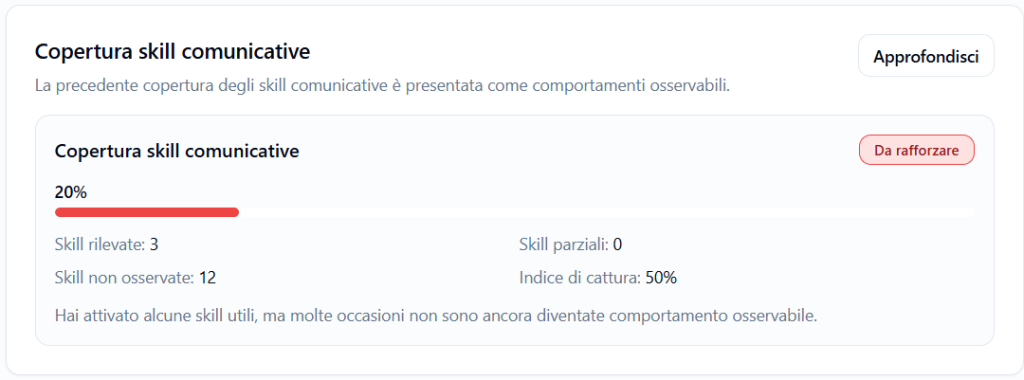
The Communicative Skills Coverage section shows how many skills planned for the simulation were actually observed.
Example:
- 20%
- Skills detected: 3
- Partial skills: 0
- Skills not observed: 12
- Capture index: 50%
This section indicates how much the Player managed to transform the expected skills into observable behaviors in the conversation.
Communication skill path #
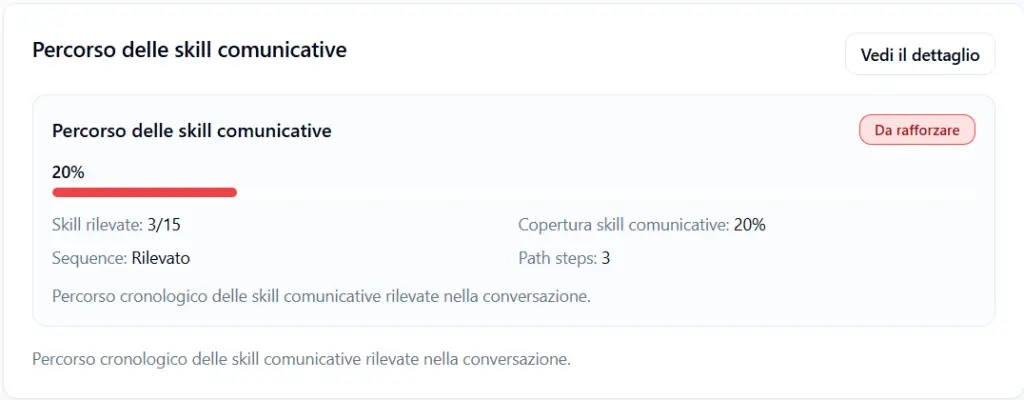
The Communicative Skills Path section shows the chronological path of the skills detected during the conversation.
It can indicate:
- detected skills;
- communication skill coverage;
- detected sequences;
- number of steps in the path.
This view helps to understand not only if a skill was used, but also when it emerged in the dialogue.
The See details button allows you to delve deeper.
Activate Super View #
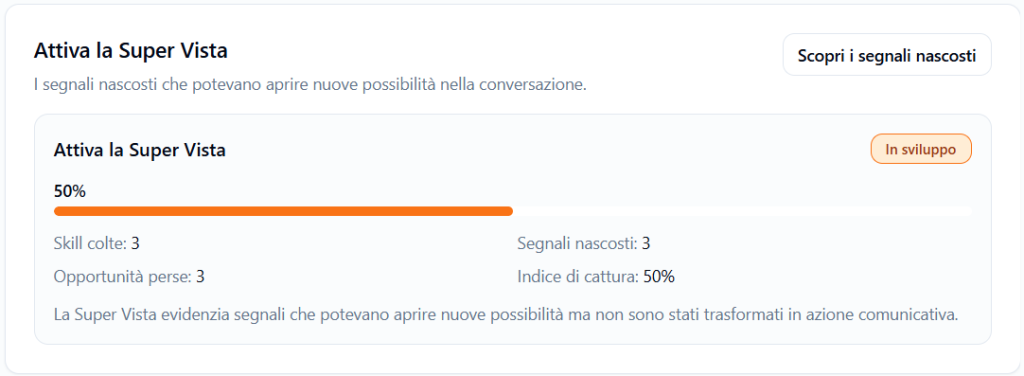
The Super View highlights hidden signals and opportunities that could have opened new possibilities in the conversation.
It can show:
- skills caught;
- hidden signals;
- missed opportunities;
- capture index.
Example:
The Super View highlights signals that could have opened new possibilities but were not transformed into communicative action.
This section is useful for understanding where the Player could have asked an extra question, clarified a point, better recognized a signal, or guided the conversation more effectively.
The Discover hidden signals button allows you to delve deeper into this part.
Conversation Map #
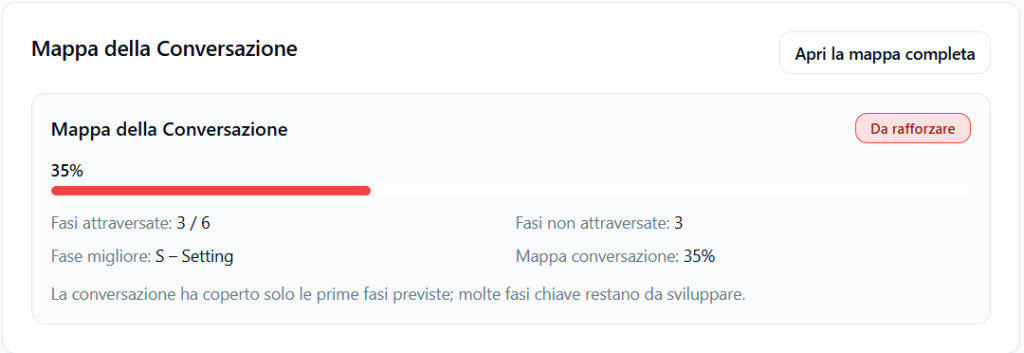
The Conversation Map shows how much the conversation went through the phases planned by the simulation.
It can include:
- phases traversed;
- phases not traversed;
- best phase;
- map coverage percentage.
Example:
- Phases crossed: 3 / 6
- Phases not crossed: 3
- Best phase: S – Setting
- Conversation map: 35%
This section helps the Player understand if the conversation advanced along the planned path or if it stopped in the early stages.
The Open full map button allows you to see more details.
Key Moments #
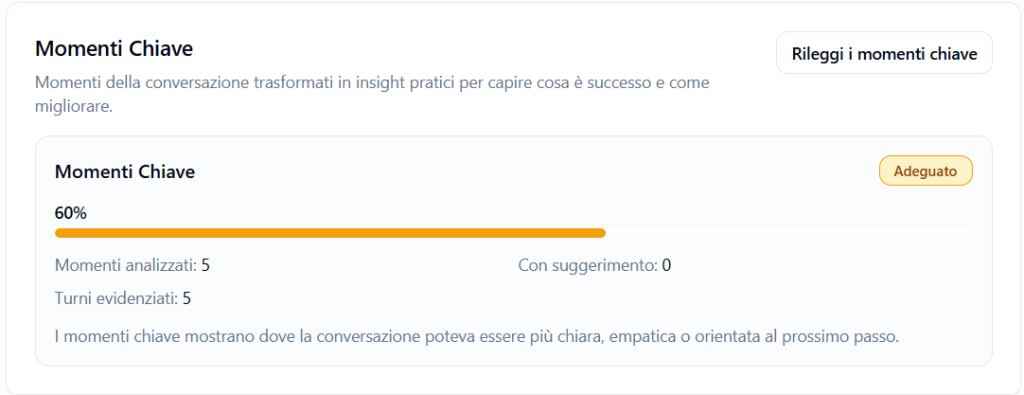
The Key Moments section transforms some passages of the conversation into practical insights.
It can include:
- analyzed moments;
- highlighted turns;
- moments with suggestions;
- overall score.
Example:
Key moments show where the conversation could have been clearer, more empathetic, or more oriented towards the next step.
The Reread key moments button allows you to return to the most important passages of the session.
Interruptions #
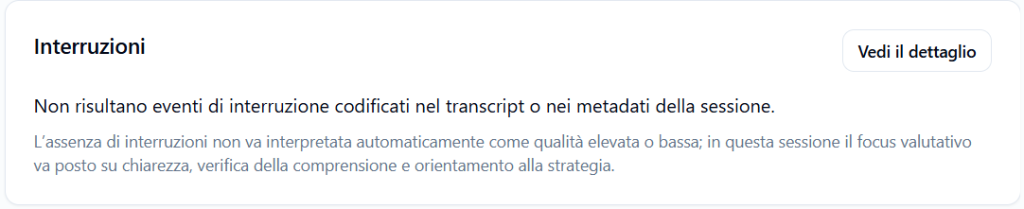
The Interruptions section indicates if any interruption events were recorded during the session.
If there are no interruptions, a message such as the following may appear:
There are no interruption events coded in the transcript or session metadata.
The absence of interruptions should not be automatically interpreted as high or low quality. It simply means that no formal interruption events were recorded.
How to read the report correctly #
The report should be read as a learning tool.
A low score does not mean that the Player “failed”, but that in that specific conversation some skills or behaviors were not observed with sufficient clarity.
The best way to use the report is to read together:
- session outcome;
- what worked;
- development areas;
- recommended next steps;
- detected skills;
- conversation map;
- key moments.
In this way, the Player can transform the result into concrete actions for the next attempt.
Best practices for the Player #
To make the best use of the Reports section, it is advisable to:
- read the general summary first;
- check what worked;
- focus on one or two development areas at a time;
- use the next steps as a guide for the next attempt;
- do not interpret the score as a personal judgment;
- compare multiple reports over time to observe evolution;
- use coaching to train specific phases or skills;
- reread the key moments to understand where the conversation could have changed direction.
Final result #
The My Reports section allows the Player to review their learning path in a clear and protected way.
The Player can consult the global profile, open reports of individual sessions, read the training evaluation, delve into skills and conversational signals, and use the next steps to improve in subsequent simulations.
The goal of the report is to help the Player understand what happened in the conversation and how to train better, while maintaining the privacy of individual data.


