
What this section is for #
The Avatar Persona section allows the Provider to choose which behavioral patterns to make available in their environment and, consequently, to the tenants managed by the Provider.
Avatar Personas are validated behavioral profiles that define how the virtual interlocutor will behave during a simulation.
From this section the Provider can:
- view activatable Avatar Personas;
- read behavioral details before adoption;
- adopt an Avatar Persona into their Provider catalog;
- see already activated Avatar Personas;
- revoke the adoption of an Avatar Persona;
- create a Provider simulation starting from an adopted Avatar Persona.
Activatable Avatar Personas #
The Activatable Avatar Personas section shows the Avatar Personas available for adoption by the Provider.
These profiles are ready to be added to the Provider catalog and, once adopted, can be used in the simulation paths of connected tenants.
The table may show:
- Avatar Persona name;
- version;
- status;
- availability if any;
- available actions.
Name #
Shows the Avatar Persona name.
Examples:
- SP7 – Anxious Person – Medical Diagnosis
- Angry Person
- SP8 – Direct but respectful assertive persona
- Avatar Persona – Angry Distrustful Family Member
- Avatar Persona – Denial Disbelief Family Member
- Avatar Persona – Supported Collaborative Family Member
The name helps the Provider quickly understand what type of virtual interlocutor can be activated.
Version #
Shows the Avatar Persona version.
Example:
1
The version is important because it identifies the validated configuration of the behavioral pattern.
Status #
Shows whether the Avatar Persona is eligible for the Provider.
Example:
provider_eligible
This indicates that the profile can be adopted by the Provider, if it has not already been activated.
Activatable from #
This column may indicate any conditions or availability dates.
If Not available appears, it means there is no specific future activation date or that the profile is available according to the platform’s current rules.
View details before adoption #
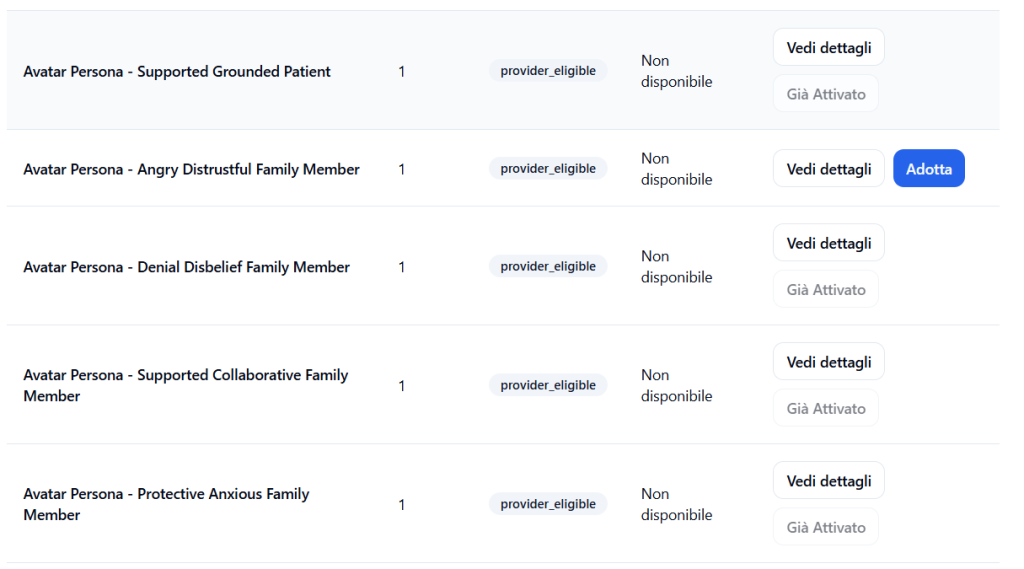
Before adopting an Avatar Persona, the Provider can click on:
View details
This action opens the Avatar Persona information sheet.
The sheet serves to deeply understand the behavioral pattern before making it available in their environment.
Avatar Persona Sheet #
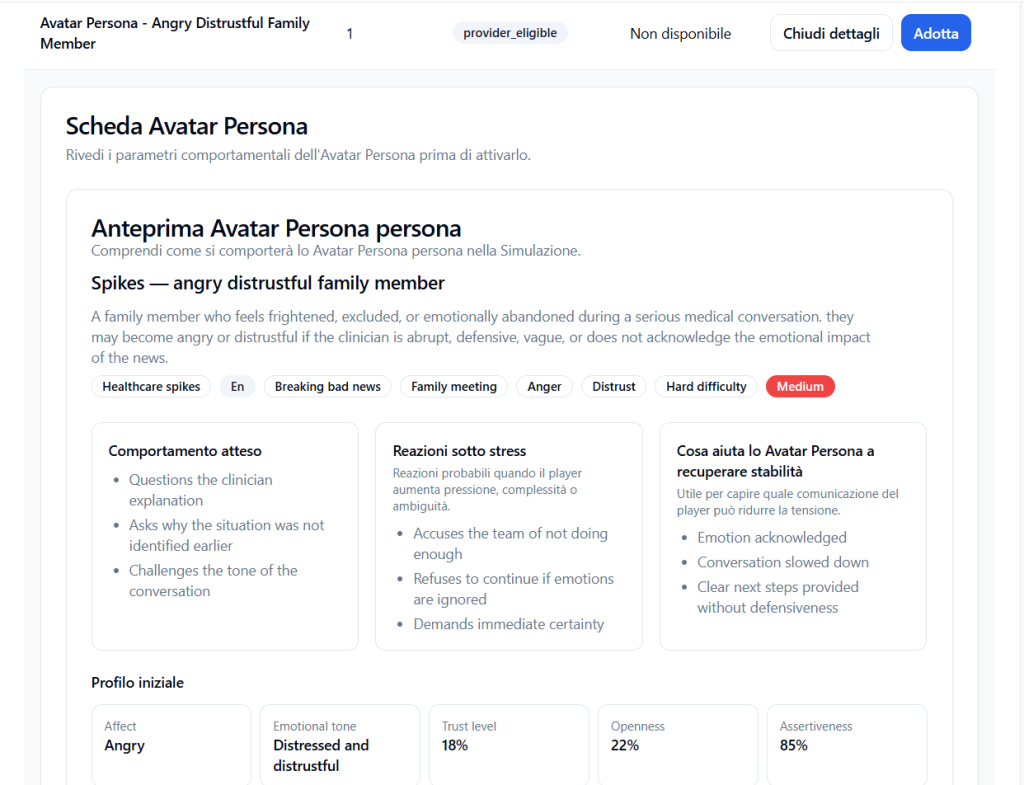
The Avatar Persona Sheet shows the avatar’s behavioral parameters before activation.
This sheet is essential because it allows the Provider to decide whether that profile is consistent with the training objectives of their tenants.
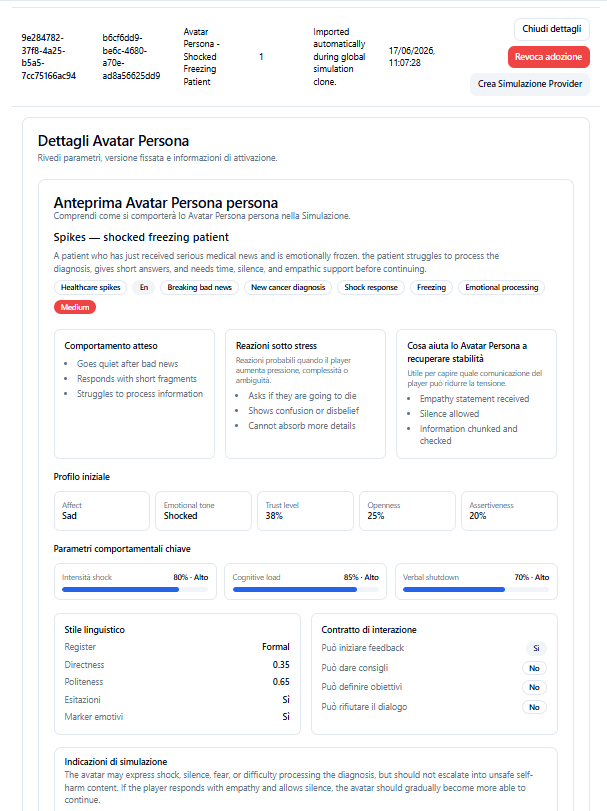
The sheet may include:
- general description;
- tags and scope of use;
- difficulty level;
- expected behavior;
- reactions under stress;
- elements that help the Avatar Persona regain stability;
- initial profile;
- key behavioral parameters;
- linguistic style;
- interaction contract;
- simulation guidelines.
General description #
The description explains who the Avatar Persona represents and what type of behavior they bring to the simulation.
Example:
Spikes — angry distrustful family member
A family member who feels frightened, excluded, or emotionally abandoned during a delicate medical conversation. May become angry or distrustful if the clinician is abrupt, defensive, vague, or does not acknowledge the emotional impact of the news.
This description helps the Provider understand whether the profile is suitable for the type of conversation they want to train.
Tags and context of use #
The sheet may show tags such as:
- Healthcare spikes;
- Breaking bad news;
- Family meeting;
- Anger;
- Distrust;
- Hard difficulty;
- Medium.
Tags help quickly classify the Avatar Persona and understand in which training contexts it may be most useful.
Expected behavior #
The Expected behavior section describes how the Avatar Persona tends to behave in conversation.
Example:
- asks questions about the clinician’s explanation;
- asks why the situation was not identified earlier;
- questions the tone of the conversation.
This information helps predict what type of conversational challenge the Player will encounter.
Reactions under stress #
The Reactions under stress section describes how the Avatar Persona may react when pressure, complexity, or ambiguity increases.
Example:
- accuses the team of not having done enough;
- refuses to continue if emotions are ignored;
- demands immediate certainty.
This part is useful for understanding how difficult, resistant, or emotionally intense the avatar can become during the simulation.
What helps the Avatar Persona regain stability #
This section describes which Player behaviors can help the avatar reduce tension and return to a more manageable conversation.
Example:
- acknowledge the emotion;
- slow down the conversation;
- provide clear next steps without defensiveness.
This information is important because it shows which Communication Skills can help the Player better manage the interlocutor.
Initial profile #
The Initial profile shows the Avatar Persona’s starting state.
It can include:
- affect;
- emotional tone;
- trust level;
- openness;
- assertiveness.
Example:
- Affect: Angry
- Emotional tone: Distressed and distrustful
- Trust level: 18%
- Openness: 22%
- Assertiveness: 85%
These parameters help the Provider understand from which emotional and relational condition the virtual interlocutor starts.
Key behavioral parameters #
The sheet may also show more specific behavioral parameters.
Example:
- Anger intensity: 75% · High
- Blame focus: 66% · High
- Need for control: 82% · High
These values describe the strength of some behavioral traits of the Avatar Persona.
An Avatar Persona with high emotional intensity or high assertiveness can generate a more challenging simulation.
Linguistic style #
The Linguistic style section describes the way the avatar tends to communicate.
It can include:
- register;
- directness;
- politeness;
- hesitations;
- emotional markers.
Example:
- Register: Informal
- Directness: 0.9
- Politeness: 0.35
- Hesitations: No
- Emotional markers: Yes
This part helps understand whether the avatar will use more direct, formal, emotional, hesitant, or assertive language.
Interaction contract #
The Interaction contract indicates which behaviors are allowed for the Avatar Persona.
It may include information such as:
- can initiate feedback;
- can give advice;
- can set goals;
- can refuse dialogue.
Example:
- Can initiate feedback: Yes
- Can give advice: No
- Can set goals: No
- Can refuse dialogue: Yes
This section serves to delimit the avatar’s behavior during the simulation.
Simulation guidelines #
The Simulation guidelines explain how to correctly use that Avatar Persona.
Example:
The avatar may be angry and challenging, but must not become abusive. The goal is to train emotional containment, transparency, and trust rebuilding in safe healthcare communication.
These guidelines are important to keep the simulation useful, realistic, and safe.
Adopt an Avatar Persona #
If the Provider believes an Avatar Persona is useful for their tenants, they can click on:
Adopt
Adoption adds the Avatar Persona to the Provider catalog.
After adoption, that profile becomes available for use in simulations managed by the Provider and connected tenants, according to platform rules.
Already activated Avatar Personas #
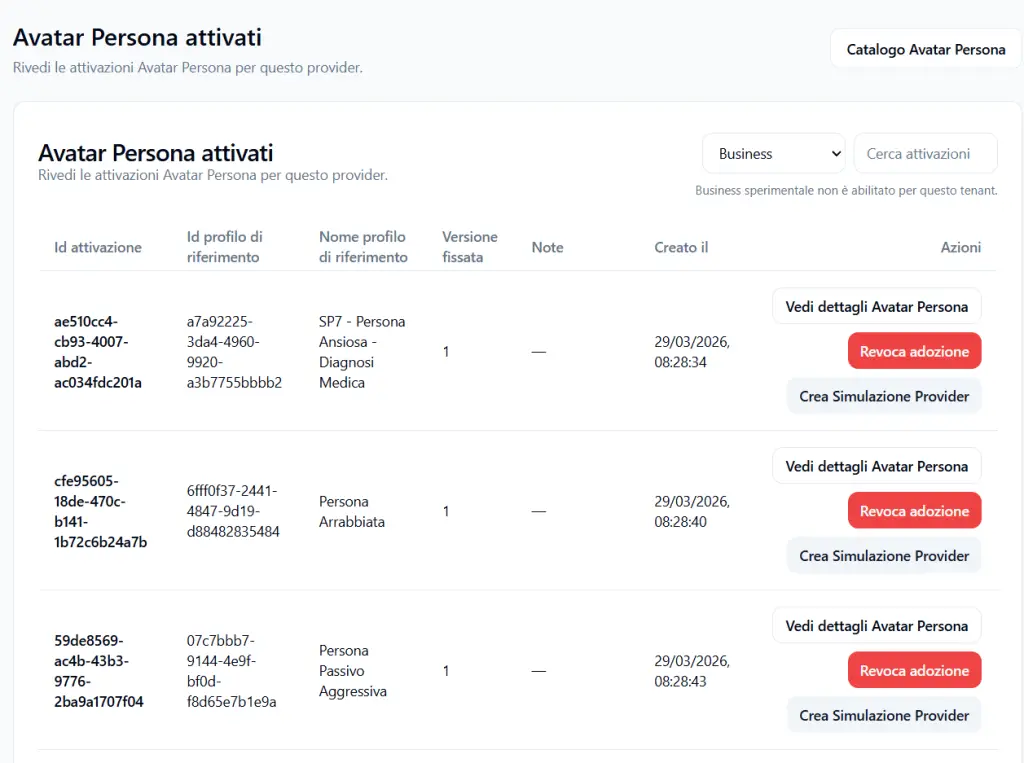
The Activated Avatar Personas section shows the Avatar Personas already adopted by the Provider.
This page allows checking which profiles are currently available in the Provider catalog.
The table may show:
- activation ID;
- reference profile ID;
- reference profile name;
- pinned version;
- notes;
- creation date;
- available actions.
Activation ID #
Technical identifier of the Avatar Persona activation in the Provider catalog.
It is useful for traceability and technical support.
Reference profile ID #
Technical identifier of the original Avatar Persona profile from which the activation derives.
Reference profile name #
Shows the name of the activated Avatar Persona.
Examples:
- SP7 – Anxious Person – Medical Diagnosis
- Angry Person
- Passive Aggressive Persona
- Avatar Persona – Shocked Freezing Patient
Pinned version #
Shows the version of the Avatar Persona adopted by the Provider.
The pinned version allows knowing which version of the behavioral pattern was activated.
Notes #
Shows any notes on the activation.
Example:
Imported automatically during global simulation clone.
This may indicate that the Avatar Persona was automatically imported because it was included in a cloned global simulation.
Created on #
Shows the date and time when the Avatar Persona was adopted into the Provider catalog.
Actions on activated Avatar Personas #
For each activated Avatar Persona, several actions may be available.
View Avatar Persona details #
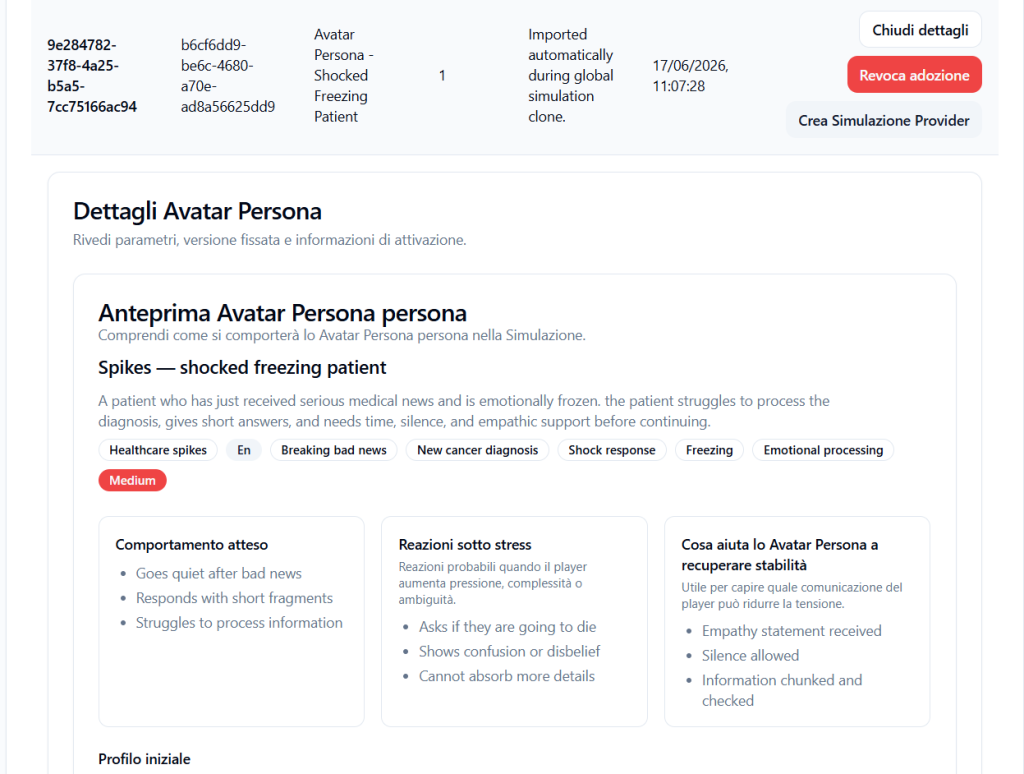
Allows viewing the complete sheet of the already adopted Avatar Persona again.
It is useful for verifying behavioral characteristics before using it in a new simulation.
Revoke adoption #
Allows revoking the adoption of the Avatar Persona from the Provider catalog.
After revocation, that Avatar Persona will no longer be available for use in new simulations of tenants connected to the Provider.
This action is useful when the Provider no longer wants to make a specific behavioral pattern available.
Before revoking adoption, it is advisable to verify whether the Avatar Persona is already used in existing simulations, to avoid operational inconsistencies.
Create Provider Simulation #
The Create Provider Simulation button allows starting the creation of a new Provider simulation based on the selected Avatar Persona.
This function is useful when the Provider wants to build a simulation around a specific behavioral pattern.
What happens if I revoke adoption #
If the Provider revokes the adoption of an Avatar Persona, that profile will no longer be available as a choice for tenants in new simulation configurations.
In practice:
- the Provider removes the Avatar Persona from their active catalog;
- Tenant Admins will no longer be able to select it for new simulations;
- the behavioral pattern will no longer be usable as an available option in the tenant catalog;
- any new simulations will need to use other still-active Avatar Personas.
Revocation therefore serves to control which behavioral patterns remain authorized in the Provider’s ecosystem.
Difference between activatable Avatar Persona and activated Avatar Persona #
Activatable Avatar Persona #
It is a profile available in the library, but not yet adopted by the Provider.
It can be viewed via View details and, if suitable, activated via Adopt.
Activated Avatar Persona #
It is a profile already adopted by the Provider.
It can be used in simulations and made available to connected tenants, according to the expected access rules.
It can be viewed, used to create simulations, or revoked.
Automatically imported Avatar Personas #
Some Avatar Personas may be automatically activated during the cloning of a global simulation.
This happens when an imported simulation already contains one or more Avatar Personas necessary for its operation.
In this case, a message such as the following may appear in the notes column:
Imported automatically during global simulation clone.
This means the Avatar Persona was added to the Provider catalog because it was required by the cloned simulation.
Why check details before adoption #
Before adopting an Avatar Persona, it is important to read its sheet.
The choice of Avatar Persona is not an aesthetic choice, but a training one.
The Provider should verify:
- whether the behavior is consistent with the training target;
- whether the difficulty level is appropriate;
- whether the emotional tone is suitable for the context;
- whether the reactions under stress are sustainable;
- whether the pattern is useful for tenants;
- whether the profile is suitable for Web or VR scenarios;
- whether it can be used safely in the planned simulations.
Practical example #
The Provider wants to make healthcare simulations on communicating difficult news available to tenants.
In the Avatar Persona catalog they find:
Avatar Persona – Angry Distrustful Family Member
Opens View details and verifies that the profile represents an angry and distrustful family member during a delicate medical communication.
Checks:
- expected behavior;
- reactions under stress;
- elements that help regain stability;
- initial profile;
- anger level;
- need for control;
- simulation guidelines.
If the profile is useful and consistent with the training objective, clicks on:
Adopt
From that moment, the Avatar Persona enters the Provider catalog and can be used in simulations available to tenants.
Best practices #
To properly manage Provider Avatar Personas, it is advisable to:
- always read the details before adoption;
- verify the profile’s difficulty level;
- check expected behavior and reactions under stress;
- assess whether the profile is suitable for managed tenants;
- adopt only Avatar Personas truly useful for training paths;
- use Create Provider Simulation when you want to design a simulation starting from a specific pattern;
- revoke adoption when an Avatar Persona should no longer be used;
- verify the impact of revocation on simulations or tenants that may have used that profile;
- keep the Provider catalog organized and consistent with the training offering.
Final result #
The Avatar Persona section allows the Provider to control which behavioral patterns are available for their tenant ecosystem.
The Provider can view activatable Avatar Personas, read details, adopt useful ones, and revoke those that should no longer be used.
Once adopted, an Avatar Persona becomes available for creating simulations.
Once revoked, it will no longer be selectable by tenants for new simulations.
This management ensures that tenants use only validated, consistent, and Provider-authorized Avatar Personas.


