
What this section is for #
The Communication Skills section allows the Provider to create, adopt, or customize the communication skills that will be used in simulations.
A Communication Skill represents an observable behavior during a conversation, for example:
- asking an open-ended question;
- checking for understanding;
- showing empathy;
- asking for consent before sharing information;
- making a risk explicit;
- guiding toward a next step.
Communication Skills are used in Observation Grids and enable the system to recognize which behaviors the Player demonstrates during the simulation.
Available modes for the Provider #
The Provider can manage Communication Skills in three ways:
- Create a Communication Skill from scratch
- Adopt a global Communication Skill as-is
- Clone and customize a global Communication Skill
These three modes allow the Provider to choose whether to start from the platform’s standard content or build skills specific to their training method.
My Communication Skills #
The My Communication Skills section displays the Communication Skills already available in the Provider catalog.
These skills may have been:
- created directly by the Provider;
- adopted from the global library;
- cloned and customized from the global library;
- imported automatically along with an Observation Grid or a cloned simulation.
Each skill may display information such as:
- Communication Skill name;
- description;
- origin;
- status;
- version;
- update date;
- available actions.
Name and description #
The main column displays the skill name and a brief description of the observed behavior.
Example:
open-question
Asking an open-ended question means formulating a question that invites the other person to explain, tell, or elaborate on their point of view, instead of simply answering with “yes”, “no”, or a limited choice.
The description helps clarify which behavior the system should recognize during the conversation.
Origin #
The Origin column indicates where the skill comes from.
Examples:
- Provider
- Tenant
- Global
- global → linked
- global → forked
The origin helps determine whether the skill was created locally, adopted from the global library, or cloned as an editable copy.
Status #
The status indicates whether the skill is active and available.
Example:
active
An active skill can be used in Observation Grids and therefore in simulations.
Version #
The version indicates the version number of the Communication Skill.
The version may increase when the skill is modified, updated, or republished.
Global Communication Skills Library #
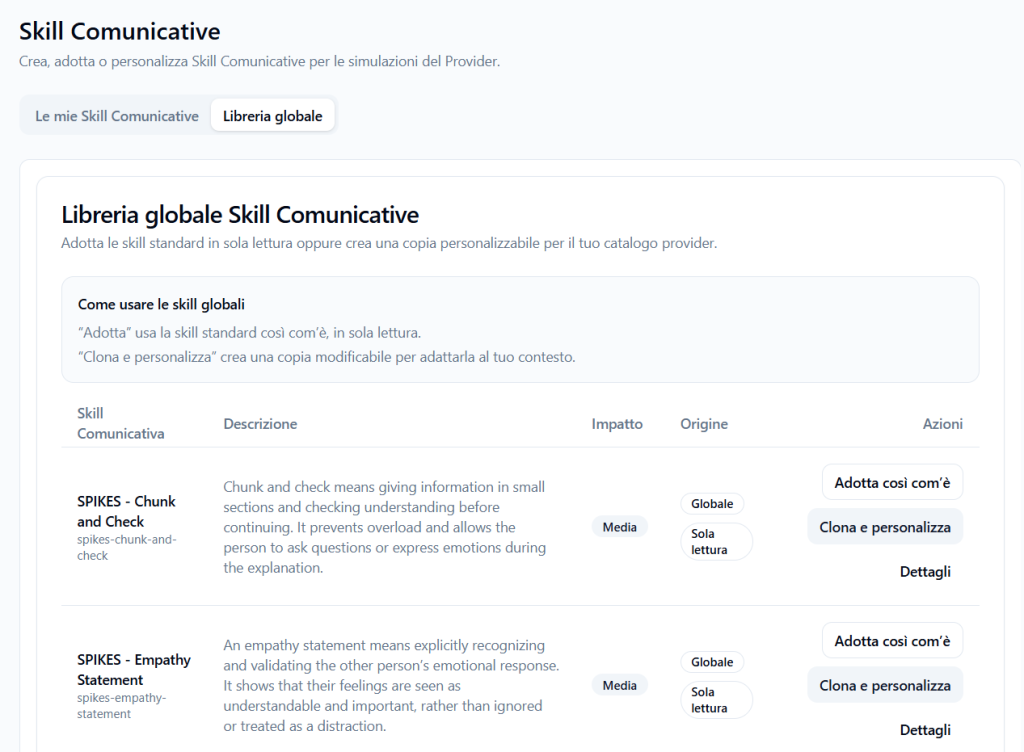
The Global Library tab displays the standard Communication Skills provided by the platform.
These skills can be used by the Provider in two ways:
- Adopt as-is
- Clone and customize
The global library is useful when the Provider wants to start from skills already structured and consistent with existing training frameworks.
Viewing details of a global Communication Skill #
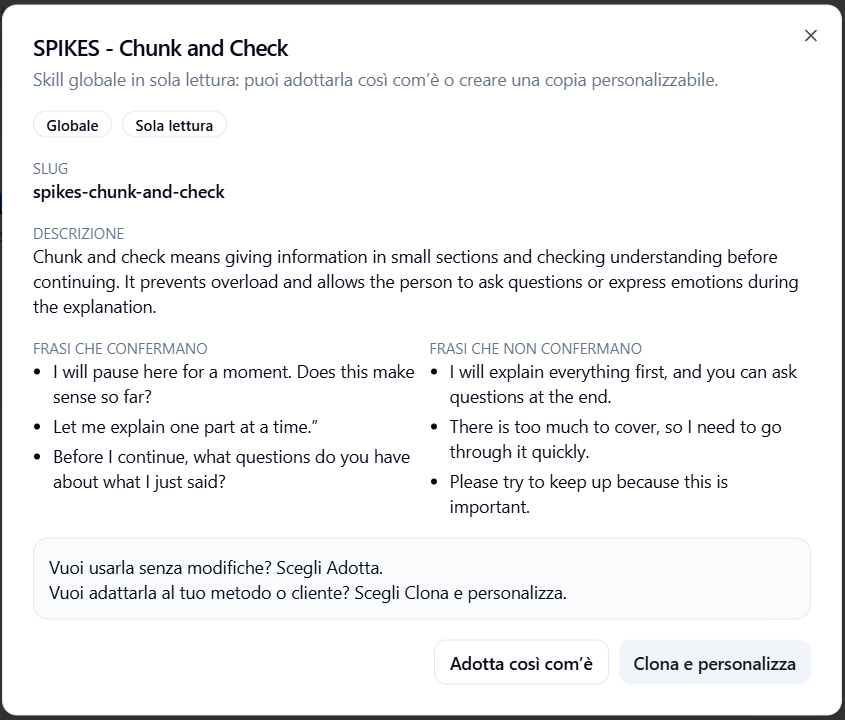
Before adopting or cloning a global skill, the Provider can click on Details.
The detail window displays the skill’s main information:
- name;
- slug;
- description;
- origin;
- read-only status;
- phrases that confirm the skill;
- phrases that do not confirm the skill.
This preview helps determine whether the skill is suitable for training objectives before adding it to the Provider catalog.
Slug #
The slug is the technical identifier of the Communication Skill.
Example:
spikes-chunk-and-check
The slug is used by the system to uniquely identify the skill.
Description #
The description explains which behavior should be recognized.
Example:
Chunk and check means giving information in small blocks and checking for understanding before continuing. It helps avoid overload and allows the other person to ask questions or express emotions during the explanation.
Confirming phrases #
Confirming phrases are positive examples—phrases the system should consider consistent with that Communication Skill.
Example:
- “I will pause here for a moment. Does this make sense so far?”
- “Let me explain one part at a time.”
- “Before I continue, what questions do you have about what I just said?”
These examples help the AI recognize when the Player is actually demonstrating the skill.
Non-confirming phrases #
Non-confirming phrases are negative examples—phrases that should not be interpreted as demonstrating the skill.
Example:
- “I will explain everything first, and you can ask questions at the end.”
- “There is too much to cover, so I need to go through it quickly.”
- “Please try to keep up because this is important.”
These examples help reduce misinterpretations.
Adopt as-is #
The Adopt as-is button allows the Provider to use a global Communication Skill without modifying it.
This mode is suitable when the standard skill is already appropriate for their training method.
A skill adopted as-is is normally read-only.
This means that:
- can be used in Observation Grids;
- maintains the platform’s standard definition;
- is not modified directly by the Provider;
- remains consistent with the global version.
This option is useful when the Provider wants to quickly use validated skills without creating custom copies.
Clone and customize #
The Clone and customize button creates an editable copy of the Communication Skill in the Provider catalog.
This mode is suitable when the Provider wants to start from a global skill but adapt it to their context.
After cloning, the Provider can modify elements such as:
- name;
- slug;
- description;
- confirming phrases;
- non-confirming phrases.
The cloned skill becomes an independent, customizable Provider copy.
This option is useful when:
- the global skill is almost correct but requires adjustments;
- the Provider uses specific terminology;
- the training method requires different examples;
- the context is healthcare, corporate, educational, or technical;
- the Provider wants to align the skill with the language of their tenants or clients.
Difference between adopting and cloning #
Adopting a skill #
Adopting means using the global skill as-is.
It is the quickest choice when the standard skill is already consistent with the objectives.
Characteristics:
- read-only;
- not modifiable;
- quick to use;
- suitable for standard content;
- maintains consistency with the global library.
Cloning a skill #
Cloning means creating a customizable copy of the skill.
It is the best choice when the Provider wants to adapt the skill to their method.
Characteristics:
- modifiable;
- customizable;
- independent from the global skill;
- suitable for specific contexts;
- useful for proprietary frameworks or clients with dedicated language.
Creating a Communication Skill from scratch #
The Provider can also create a completely new Communication Skill.
This option is useful when the desired skill is not present in the global library or when the Provider wants to build a specific observable behavior.
Creation occurs in two steps:
- filling in the skill and examples;
- reviewing the AI interpretation and publishing.
Step 1 – Communication Skill + examples #
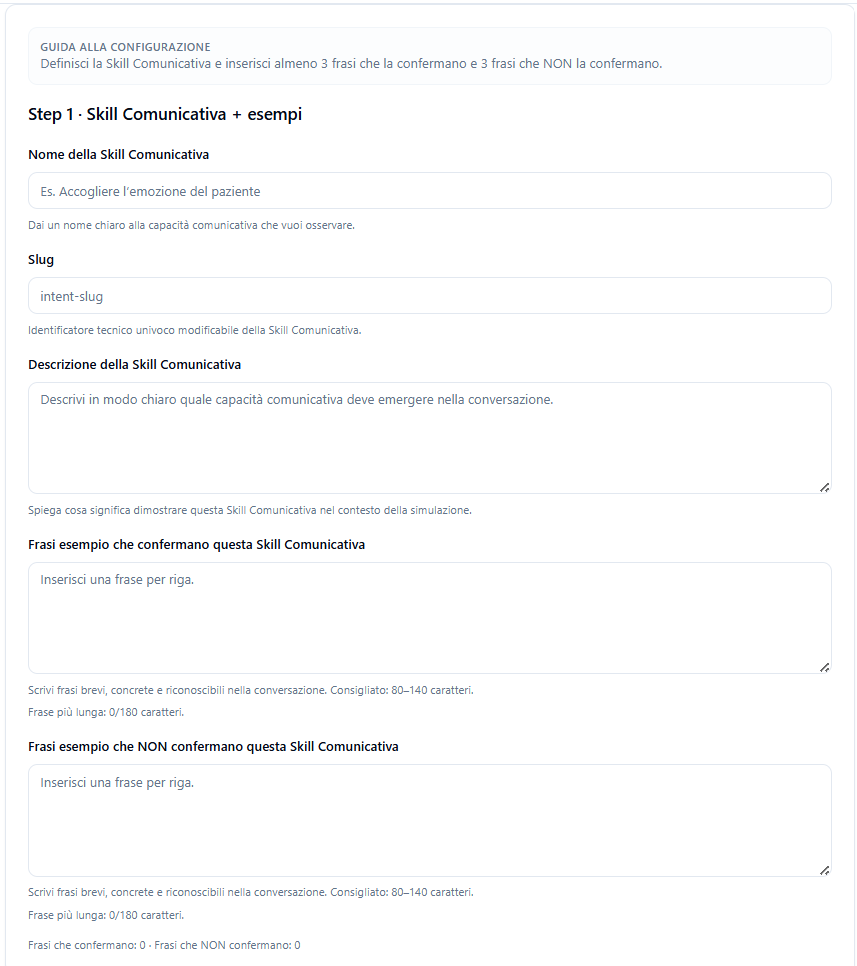
In the first step, the Provider defines the skill.
The main fields are:
- Communication Skill name;
- slug;
- description;
- confirming phrases;
- non-confirming phrases.
Communication Skill Name #
Enter a clear and understandable name.
Example:
Open Question
The name should describe the communication skill to be observed during the conversation.
Slug #
The slug is the unique technical identifier of the skill.
Example:
open-question
It is recommended to use a slug that is:
- short;
- lowercase;
- without spaces;
- with hyphens between words.
Communication Skill Description #
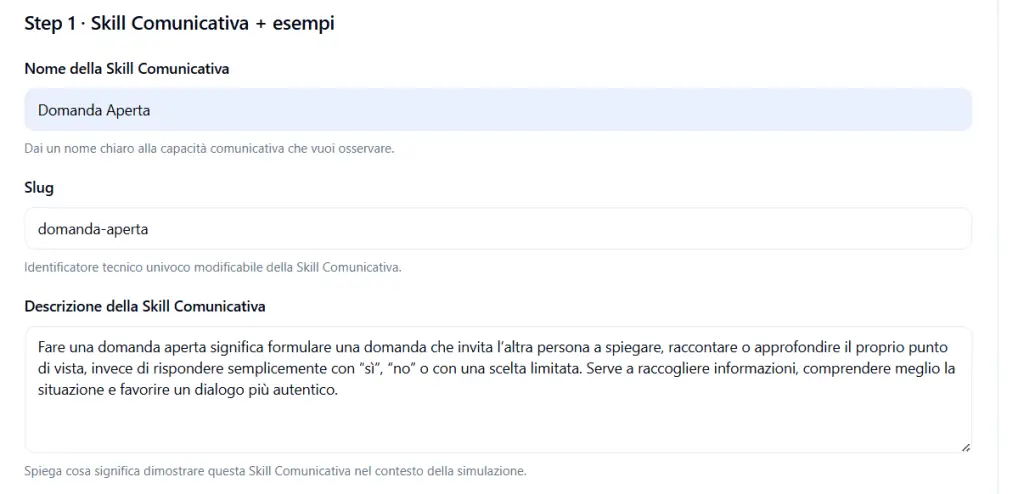
The description should clearly explain which communication behavior should emerge in the simulation.
Example:
Asking an open-ended question means formulating a question that invites the other person to explain, tell, or elaborate on their point of view, instead of simply answering with “yes”, “no”, or a limited choice. It serves to gather information, better understand the situation, and foster a more authentic dialogue.
The description is important because it helps the AI understand what to recognize.
Example phrases that confirm this Communication Skill #
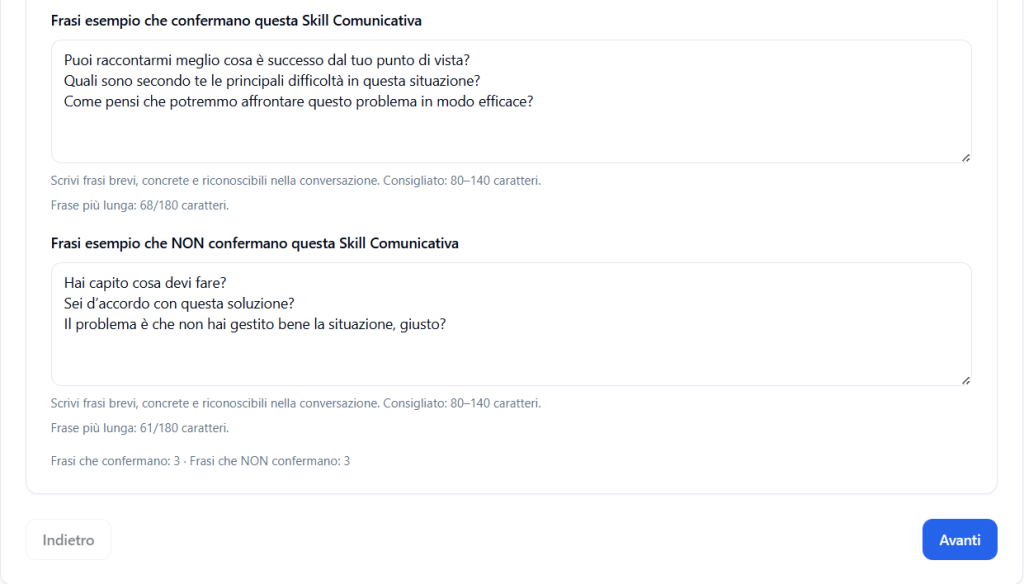
In this field, you must enter at least 3 phrases that represent positive examples of the skill.
Each phrase must be entered on a separate line.
Example:
Can you tell me more about what happened from your point of view?
What do you think are the main difficulties in this situation?
How do you think we could address this problem effectively?
The phrases should be:
- short;
- concrete;
- realistic;
- recognizable in a real conversation.
Example phrases that do NOT confirm this Communication Skill #
In this field, you must enter at least 3 phrases that should not be interpreted as demonstrating the skill.
Each phrase must be entered on a separate line.
Example:
Do you understand what you need to do?
Do you agree with this solution?
The problem is that you didn’t handle the situation well, right?
Negative examples help the system better distinguish the skill from similar but not equivalent behaviors.
Step 2 – AI Interpretation Review #
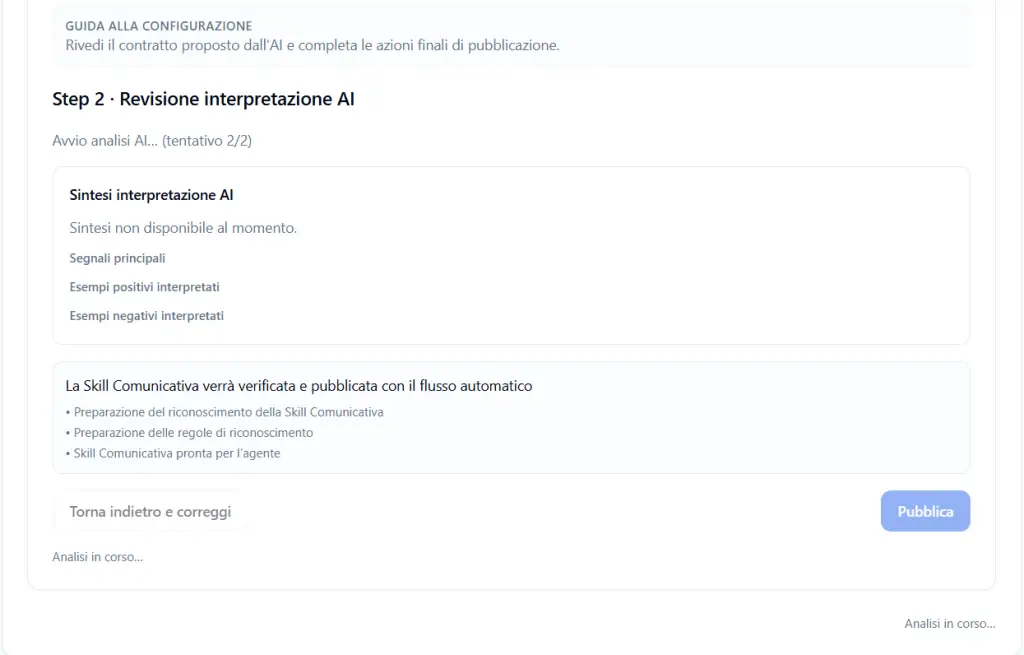
After completing the data, the system initiates an automatic review of the AI interpretation.
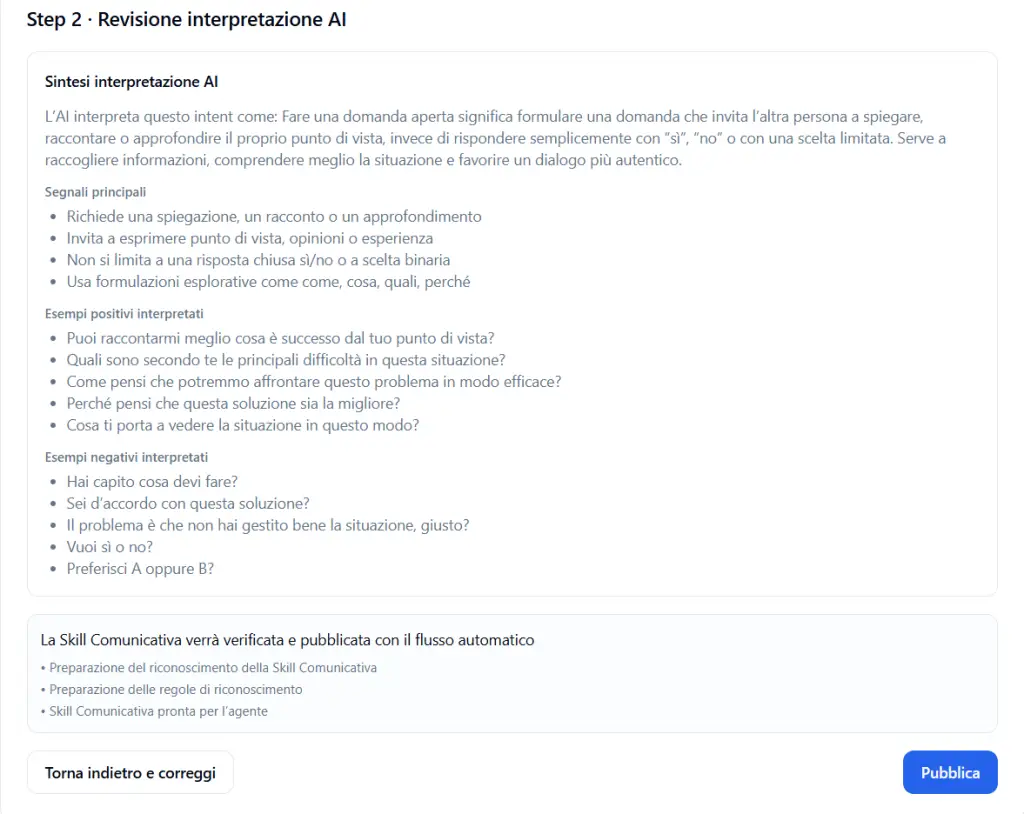
At this stage, a summary is displayed of how the AI has understood the Communication Skill.
The review may include:
- AI interpretation summary;
- main signals;
- interpreted positive examples;
- interpreted negative examples.
The Provider must verify that the interpretation is consistent with the skill’s objective.
If the AI interpretation is correct #
If the summary and interpreted examples are correct, the Provider can proceed with publication.
By clicking Publish, the Communication Skill is verified and prepared for use by the agent.
If the AI interpretation is not correct #
If the interpretation is not correct, click on:
Go back and correct
The Provider can modify:
- description;
- positive examples;
- negative examples;
- name;
- slug.
After correction, the system repeats the analysis.
Publishing the Communication Skill #
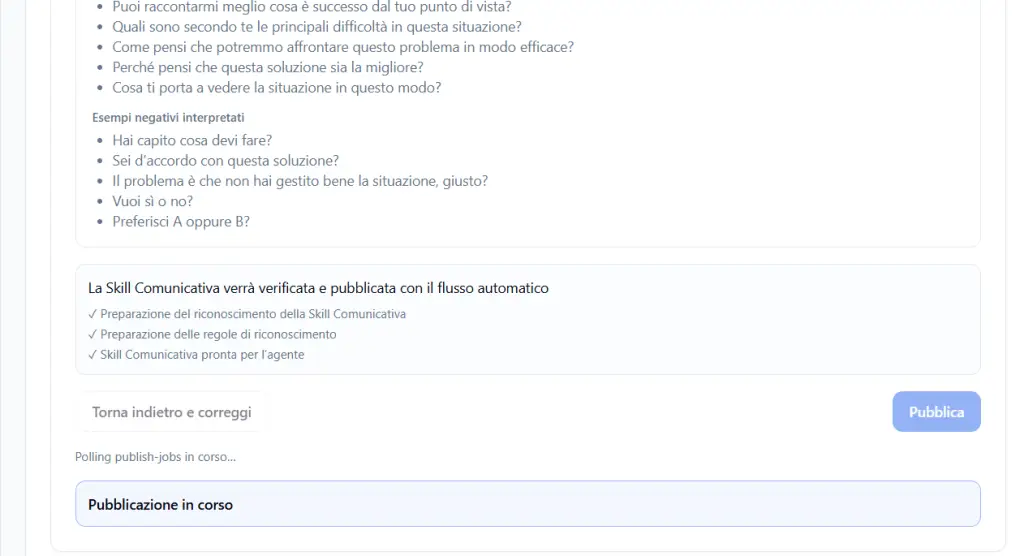
During publication, the system prepares the skill to be recognized during conversations.
The screen may display steps such as:
- preparation of Communication Skill recognition;
- preparation of recognition rules;
- Communication Skill ready for the agent.
During this phase, messages may appear such as:
- Analysis in progress;
- Publishing in progress;
- Polling publish-jobs in progress.
When publication is complete, the skill becomes available in the Provider catalog.
How Communication Skills are used #
Communication Skills are not used alone.
They are normally inserted into an Observation Grid.
The grid organizes skills into conversation phases.
Example:
- Setting phase: Safe Conversation Framing, Readiness Check;
- Perception phase: Open-ended Question, Perception Check;
- Knowledge phase: Plain Language Explanation, Chunk and Check;
- Emotions phase: Empathy Statement;
- Strategy / Summary phase: Shared Next Step.
During the simulation, the system observes whether the Player demonstrates the skills expected by the grid.
When to create, adopt, or clone #
Create from scratch #
Use this option when:
- the skill does not exist in the global library;
- the Provider has a proprietary method;
- the skill is specific to a client, department, or sector;
- highly customized examples are needed.
Adopt as-is #
Use this option when:
- the global skill is already suitable;
- no modifications are needed;
- you want to maintain a standard definition;
- you want to speed up configuration.
Clone and customize #
Use this option when:
- the global skill is useful but needs adaptation;
- examples closer to your context are needed;
- the Provider wants to modify the description or phrases;
- you want to maintain an independent copy in the Provider catalog.
Practical example #
The Provider wants to use the skill:
SPIKES – Chunk and Check
Opens the details and verifies:
- description;
- confirming phrases;
- non-confirming phrases.
If the skill is already perfect for their method, click on:
Adopt as-is
If instead they want to adapt examples and description to their context, click on:
Clone and customize
If no global skill is suitable, create a new Communication Skill from scratch.
Releasing Communication Skills to tenants #
Communication Skills created, adopted, or customized by the Provider are not only for building the Provider’s simulations.
They can also be made available to connected tenants, so that Tenant Admins can use them in their own simulations and Observation Grids.
This means the Provider can build a shared catalog of Communication Skills to make available to tenants.
Tenants can then use these skills to:
- create new Observation Grids;
- build guided simulations;
- observe communication behaviors consistent with the Provider’s method;
- maintain a common training language across multiple tenants;
- reuse already validated skills instead of creating them from scratch.
Why releasing skills to tenants is useful #
Releasing Communication Skills to tenants allows the Provider to maintain methodological consistency across multiple environments.
For example, if the Provider creates a skill such as:
Open-ended question
or
Comprehension check
this skill can be used both in simulations created by the Provider and in simulations that Tenant Admins build independently in their own tenants.
This way, tenants can work with the same observational standards and the same definition of communication behaviors.
Practical example #
The Provider creates or clones a Communication Skill called:
SPIKES – Readiness Check
This skill is added to the Provider catalog.
Subsequently, connected tenants can use it to create their own Observation Grid, for example in a healthcare simulation, without having to rewrite the description, positive examples, and negative examples from scratch.
The Provider thus maintains a common foundation of communication skills, while each tenant can apply them to their own simulations.
Best practices #
To properly manage Provider Communication Skills, it is recommended to:
- always check the global library before creating a skill from scratch;
- open the details before adopting or cloning a skill;
- adopt global skills when they are already consistent with your method;
- clone skills when customization is needed;
- create from scratch only when the skill does not exist or is very specific;
- write concrete, not generic descriptions;
- enter at least 3 positive examples and 3 negative examples;
- use realistic phrases recognizable in conversation;
- always verify the AI interpretation before publication;
- use skills within Observation Grids consistent with the simulation’s objectives.
Final result #
The Communication Skills section allows the Provider to build their own catalog of observable behaviors.
The Provider can:
- create skills from scratch;
- adopt global skills in read-only mode;
- clone global skills and customize them;
- verify the AI interpretation;
- publish skills ready to be used in Observation Grids.
The Provider’s Communication Skills thus function as a shared methodological library.
The Provider can use them for their own simulations and, at the same time, release them to tenants so they can build simulations consistent with the same training framework.


